Published on
August 7, 2026

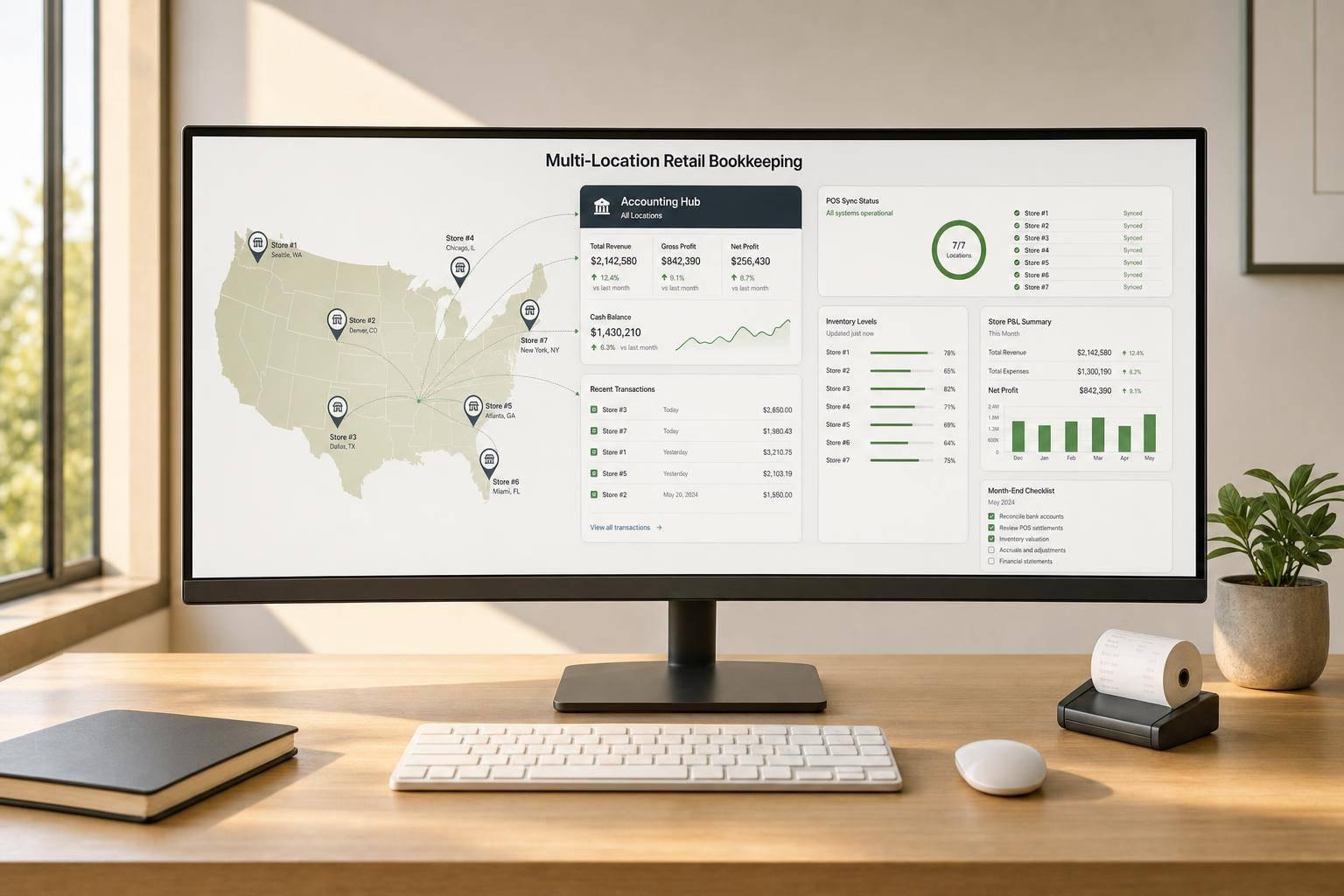
If you run 2 or more stores, your bookkeeping choice usually comes down to one thing: less cleanup at month-end. The best-fit tools in this review are QuickBooks Online + QuickBooks Commerce, Xero, Brightpearl, NetSuite, Lightspeed Retail + Lightspeed Accounting, Retail POS X-Series, and Retail Pro Accounting Links.
Here’s the short version:
If I were narrowing the list fast, I’d group them like this:
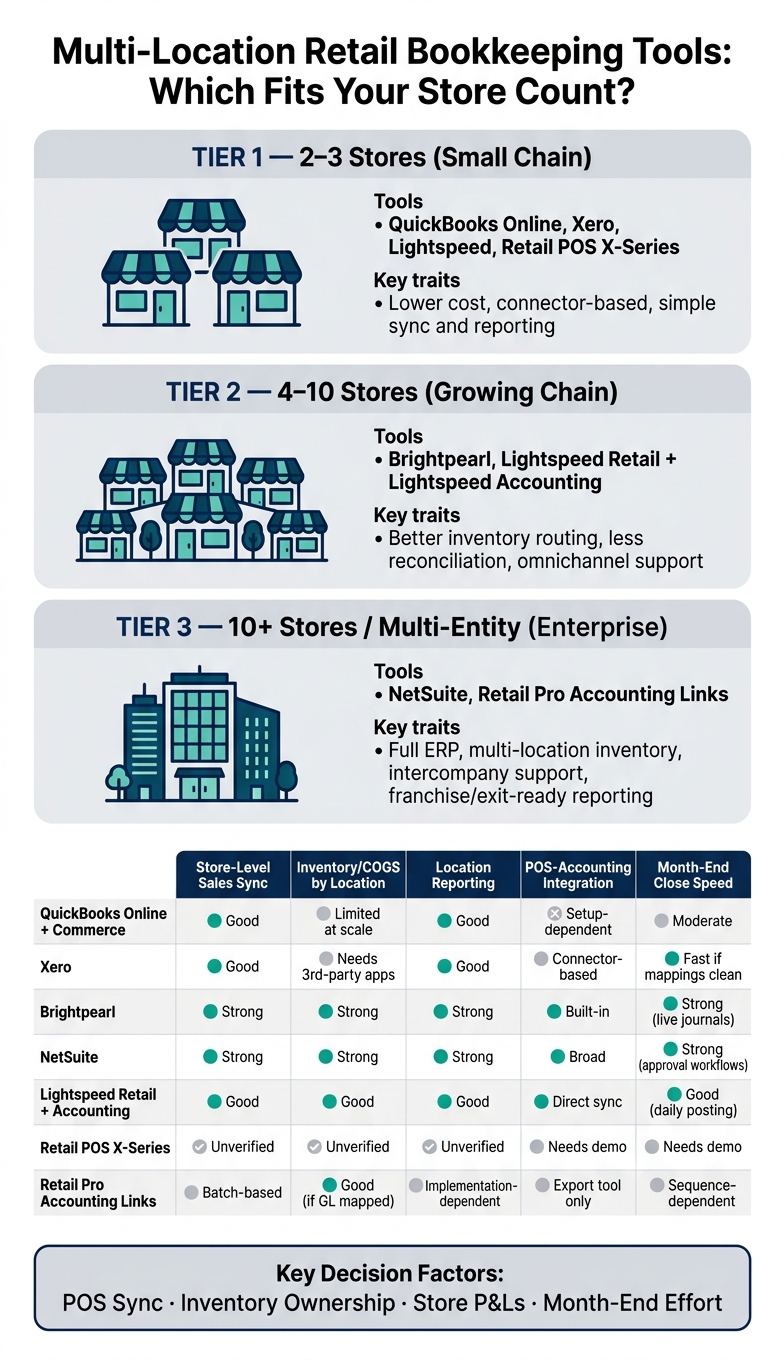
Multi-Location Retail Bookkeeping Tools: Which Fits Your Store Count?
| Tool | Multi-store sales | Inventory/COGS by location | Store reporting | POS/accounting link | Close workflow |
|---|---|---|---|---|---|
| QuickBooks Online + QuickBooks Commerce | Good if location/class setup is fixed | Limited as store count grows | Good with clean coding | Works, but setup matters | Better with strict rules |
| Xero | Good with mapped POS feeds | Often needs third-party apps | Good via tracking categories | Connector-based | Fast if mappings stay clean |
| Brightpearl | Strong | Strong | Strong | Built into system flow | Strong due to live journals |
| NetSuite | Strong | Strong | Strong | Broad system coverage | Strong with approvals |
| Lightspeed Retail + Lightspeed Accounting | Good for Lightspeed users | Good with setup choices | Good with location tags | Direct sync to QBO/Xero | Good with daily posting |
| Retail POS X-Series | Not fully verified here | Not fully verified here | Not fully verified here | Needs direct review | Needs direct review |
| Retail Pro Accounting Links | Batch-based | Good if GL mapping is done well | Depends on implementation | Export tool, not live sync | Depends on export order |
Bottom line: if you want fewer moving parts, look first at Brightpearl or NetSuite. If you want lower cost and can keep mappings clean, start with QuickBooks Online, Xero, or Lightspeed. And if your team relies on Retail Pro, pay close attention to export timing and GL mapping.
That’s the frame I’d use before getting into the full tool-by-tool review.
QuickBooks Online + QuickBooks Commerce works best when every store follows the same location setup. That way, sales, inventory, and deposits stay easy to track by store instead of getting mixed together. The main issue here is simple: can the system keep each store’s sales, inventory, and close process separate without extra cleanup?
Assign each POS feed and deposit to a fixed store location or class. If you don’t, sales can end up dumped into one generic ledger bucket, which makes store-by-store reporting messy.
Use the same item names and location rules across all stores. When naming drifts from one store to another, stock counts and COGS get harder to compare.
Location-based reporting only works when every store is coded the same way. When that setup is clean, it’s much easier to compare store performance without going back and reclassifying transactions.
Month-end close moves faster when deposits, sales, and inventory adjustments all follow one location model. It cuts down on manual fixes and makes the process much less painful.
That baseline starts to matter even more as store count grows and the close depends on clean POS-to-ledger mapping.
Xero works well for retailers that need clean POS sync and reporting by store. But there’s a catch: your account mapping has to stay tight. If you set up POS data the right way from day one, Xero can act as a hub for multiple locations. Direct integrations also cut down on manual entry and shorten close lag.
Xero can sync POS sales, refunds, discounts, taxes, payment methods, and gift cards through daily summaries or live API feeds. The key is simple: map each transaction type to the right account in your chart of accounts.
Payment types also need to land in the correct clearing or takings account. If that setup is sloppy, reconciliation gets messy fast. A daily total check helps you catch sync issues early, before they snowball into month-end problems.
Xero’s native inventory is limited for multi-store retail. In most cases, by-location stock and COGS rely on third-party inventory integrations.
Xero uses tracking categories to split data by store and produce a P&L by location. That setup works, but only when tagging stays consistent across every transaction.
Daily syncs can make the close process faster and give managers near-real-time visibility into store performance. Threshold alerts for refunds and large transactions also help keep reviews focused on exceptions instead of forcing teams to dig through everything.
Xero’s fit comes down less to the software alone and more to how well the POS connection and account mapping are maintained.

Brightpearl is a good fit for retailers that want automated journals and cleaner store-level accounting without a lot of manual fixes.
What makes it stand out is its real-time journal entries. Instead of patching things together after the fact, stores can send data into the ledger as sales happen. That cuts down on manual cleanup across locations.
You can map each POS outlet to a warehouse or outlet, so sales post to the general ledger by location with a clear audit trail. Brightpearl sends POS data straight into accounting journals, which means less manual entry and fewer chances for mistakes.
Warehouse-level mapping helps keep inventory lined up by store or location inside the ledger. If you run more than one outlet, that setup makes it much easier to see where stock sits and how it flows.
Outlet-level posting makes store-by-store review faster and cleaner. Instead of sorting through mixed data, you can look at each location on its own and spot issues without digging through extra noise.
Real-time journals keep the ledger current and shorten month-end close. For multi-store retailers, that means less manual reconciliation and a tighter close process across every location. This setup works especially well when store data needs to hit the books fast.
NetSuite takes a broader system approach. It gives retailers more control when they want accounting, inventory, and user permissions in one place.
That setup works well for multi-location retailers that need a single system for stores, teams, access rules, and accounting data.
The main job here is simple: assign each store’s sales, access, and reporting rules clearly. Sales post by location, and permission controls decide which teams can edit or review those entries. That helps keep store-level data clean and stops overlap between locations.
That same setup also affects stock visibility and location-level reporting across stores.
Each location can keep its own inventory records. So stock levels and COGS post by store instead of getting mixed into one shared account.
That split makes it much easier to track shrinkage, transfers, and cost of goods at the store level without doing manual allocation.
NetSuite’s reporting can be filtered by location, which gives managers a P&L view for each store without rebuilding the data from scratch.
When location tagging is used the same way across the business, store-by-store comparisons come straight from the ledger with less cleanup.
When sales, inventory, and permissions run through one system, the close process depends less on pulling numbers from separate sources.
Approval workflows can also be set by location. That means each store’s entries move through review in a clear sequence before the books close.

Lightspeed works best when your POS and books need to stay in lockstep across multiple stores. Pairing Lightspeed Retail with Lightspeed Accounting gives retailers a POS-first bookkeeping setup that sends daily sales data into QuickBooks Online, QuickBooks Desktop, or Xero.[6]
Each Lightspeed store can map to its own location in the accounting setup. When transactions post, a Class field or another location tag assigns each entry to the right store.[2] That lets you keep several locations inside one accounting company without mixing up store activity.
That same location setup also flows into inventory and COGS.
When the Book Inventory/COGS option is turned on, Lightspeed creates journal entries so inventory value is recorded when purchased and then moved to COGS when items sell.[2] You can use one Inventory asset account and one COGS account for a centralized setup, or split COGS by location if store-level inventory reporting matters more.[4][5]
Once inventory is posted by location, store reporting gets much easier to read.
Because transactions carry location tags into the accounting system, you can run location-based reports and review P&L by store inside one accounting company.[2][7] That gives you a clean way to look at store performance while still keeping consolidated reporting in the same books.
Daily automated postings cut down on manual reconciliation across locations, which helps shorten the close process for multi-store retailers.[6][7]
For retailers already using Lightspeed POS, this setup keeps daily sales, inventory, and reporting lined up in one system.
Retail POS X-Series doesn’t have enough verified information available to judge its store-level sales sync, inventory mapping, location reporting, or month-end close workflows using the same framework applied to the other tools in this comparison.
So instead of padding this section with guesses, it’s left out of the side-by-side analysis.
If you’re looking at X-Series, ask for a direct demo that focuses on multi-location accounting integration before making any calls.
Retail Pro Prism Accounting Link is a paid add-on that exports receipts, GL, AR, and AP data from Retail Pro Prism POS to accounting software. It works with QuickBooks Desktop (2019–2024) and Sage 100 ERP Desktop (2019–2024), and it uses .IIF files for QuickBooks.[8][9]
So this isn’t a live POS sync tool. It’s built more for batch exports, clean GL mapping, and tight process control.
Retail Pro exports store sales in batches. That means export timing and setup have a big impact on whether transactions land cleanly in accounting.[8][9]
Because the link runs in batches, the process matters. If exports happen at the wrong time or the setup is off, store-level sales can get messy in the books.[8][9]
Inventory mapping begins with GL accounts for inventory, COGS, purchase variances, and adjustments. From there, the link batches purchase, receiving, transfer, adjustment, and write-off activity into journal entries, which creates an audit trail by location.[8][9][11][10]
If you want a closer look at margin by product group, mapping inventory and COGS accounts by category or department can help.
Retail Pro supports sublocations and consolidated reporting for multi-site retailers, including franchise structures.[12][13] How location reporting shows up in the GL comes down to the mappings set during implementation.
Month-end close depends on getting the sequence right before exports run. All inventory documents need to be posted in Retail Pro before running Accounting Link, so order matters.[10]
After the export runs, the main reconciliation step is matching the inventory subledger and stock reports to the GL. That’s how teams catch gaps caused by timing differences or missing transfers.[10][11]
It also helps to map freight-in, purchase discounts, and shrinkage to separate GL accounts so COGS stays clean.[10] For retailers aiming for growth or a future M&A deal, this part matters a lot. Buyers and lenders usually want clean, auditable location-level financials and a documented close process during due diligence.[10]
No single tool works for every multi-location retailer. The right pick depends on your store count, how messy your inventory gets, and how much integration work your team can take on.
The table below shows where each tool stands out for simple accounting, tighter automation, or deeper retail control.
| Tool | Best For | Main Strengths | Main Limitations |
|---|---|---|---|
| QuickBooks Online + QuickBooks Commerce | Small to mid-sized U.S. retailers with 2–10 stores selling in-store and online | Location tracking in one QuickBooks account with basic inventory and order management | No true multi-warehouse stock visibility; manual workarounds increase as store count grows [17][18] |
| Xero | Small to mid-sized chains that want cloud-first accounting and a connector-based retail stack | Cloud accounting, tracking categories by location, and daily sales summaries from connected apps | Depends on third-party apps for retail and POS needs; more integrations create more reconciliation risk at month-end [19] |
| Brightpearl | Multi-channel brands doing about $1M+ in annual revenue across stores and warehouses | One system of record with built-in accounting, inventory, warehousing, and automation [3][20][21] | Higher setup cost, lower close effort; implementation requires process discipline |
| NetSuite | Enterprise omnichannel retailers with complex inventory, multi-entity structures, and multi-state or global footprints | Full retail ERP with native multi-location inventory, intercompany support, and advanced reporting [16][15] | High licensing cost, long implementation, and a steep learning curve |
| Lightspeed Retail + Lightspeed Accounting | Growing 2–8 store chains already using Lightspeed POS | Store-level account mapping and daily sync to QuickBooks or Xero | Mapping must be repeated for each new store, and misconfigured accounts can misclassify revenue or tax lines |
| Retail POS X-Series | Omnichannel brands that want POS flexibility with cloud accounting | Multi-store POS with daily summary posting to Xero or QuickBooks | Accounting and inventory remain separate, so timing gaps require manual reconciliation |
| Retail Pro Accounting Links | Specialty and regional chains already running Retail Pro for multi-store operations | Universal Accounting Link bridges Retail Pro to standard accounting packages [14] | Detailed operational and financial views remain split between systems; version changes can require technical support [14] |
The big split here is all-in-one systems versus connector-based stacks.
Tools like Brightpearl and NetSuite keep orders, inventory, and accounting journals in one place. That usually means less reconciliation work across sales sync, inventory mapping, location reporting, and month-end close. The trade-off is simple: you pay more up front, and setup takes care and discipline.
By contrast, app-connected setups like Xero with third-party apps, Lightspeed Accounting, and Retail POS X-Series are often easier to get live for a 2–5 store operation. That sounds great at first. But as store count climbs, those setups can start to feel like duct tape - fine until one sync breaks, a mapping slips, or month-end turns into a cleanup job.
That split leads straight into the final recommendation.
Choose based on four things: POS sync, inventory ownership, store P&Ls, and month-end effort. Here’s the quick fit guide:
| Scenario | Best Fit | Why |
|---|---|---|
| 2–3 stores, primarily brick-and-mortar, simple inventory | Small-business accounting + native POS integrations (QuickBooks Online, Xero, QuickBooks Commerce, Lightspeed Accounting, or Retail POS X-Series) | Lower cost; enough for simple sync and reporting |
| 4–10 stores, omnichannel mix of in-store and eCommerce sales | Retail operations platform with accounting integration (Brightpearl or Lightspeed Retail + Lightspeed Accounting) | Better inventory routing; less reconciliation |
| 10+ stores, multiple regions, centralized inventory | Mid-market ERP (NetSuite) with retail/POS integrations | Handles complex locations and centralized purchasing |
| Franchise or multi-entity structure with store-level P&Ls | ERP or enterprise POS with accounting links (NetSuite or Retail Pro-based stack) | Built for entities and owner-level reporting |
| Fast-growing, exit-ready retail brand | ERP + FP&A support (NetSuite or Brightpearl plus a data layer) | Investor-ready reporting and audit trails |
One thing trips up a lot of teams: software won’t fix a messy process by itself. A well-set-up QuickBooks Online account, paired with disciplined workflows, can beat a poorly rolled-out ERP. The retailers that get the most from these tools usually standardize their SKUs, location codes, tax rules, and transfer workflows before go-live, not after.[22][23][1]
If the business is scaling fast, outside help can make this a lot less painful. For growth-stage retailers, Phoenix Strategy Group can help connect the right stack to fundraising, banking, and exit goals, while also building bookkeeping, FP&A, and data systems that your team can actually use.
The best tool is the one your team can run today and still grow with over the next 3–5 years without a major rebuild.
For many mid-market organizations, ERP moves from a “nice to have” to a strategic priority once they reach 3 to 10 entities.
That shift usually starts earlier than people expect. In many cases, manual consolidation begins to crack at around 3 to 4 entities. The pressure builds fast when intercompany activity grows, new acquisitions need to be folded in, or reporting requests keep piling up.
That’s where an integrated ERP starts to pay off in plain terms. It can cut month-end close times by 30% and improve finance team productivity by up to 40%. For finance teams, that can mean getting consolidated management accounts out within 10 working days instead of scrambling through spreadsheets and last-minute fixes.
Month-end cleanup usually starts with timing gaps and reconciliation mistakes that no one fixed during the day-to-day work.
The usual trouble spots are pretty familiar: POS sales don’t line up with bank deposits, refunds, voids, and chargebacks hit in different periods, tender codes get mapped to the wrong accounts, and intercompany balances sit there without follow-up.
When teams don’t reconcile these items daily, month-end turns into a reactive, manual fire drill.
It depends on your size and what you need to report. For multi-location retailers, the main goal is a shared data setup where your financial system, POS, and inventory tools all use the same numbers.
A single central accounting platform can make day-to-day work and consolidation much simpler. As you grow, you may need connected specialty apps too. That can work well, as long as they integrate cleanly and keep data consistent across teams.