Published on
July 21, 2026

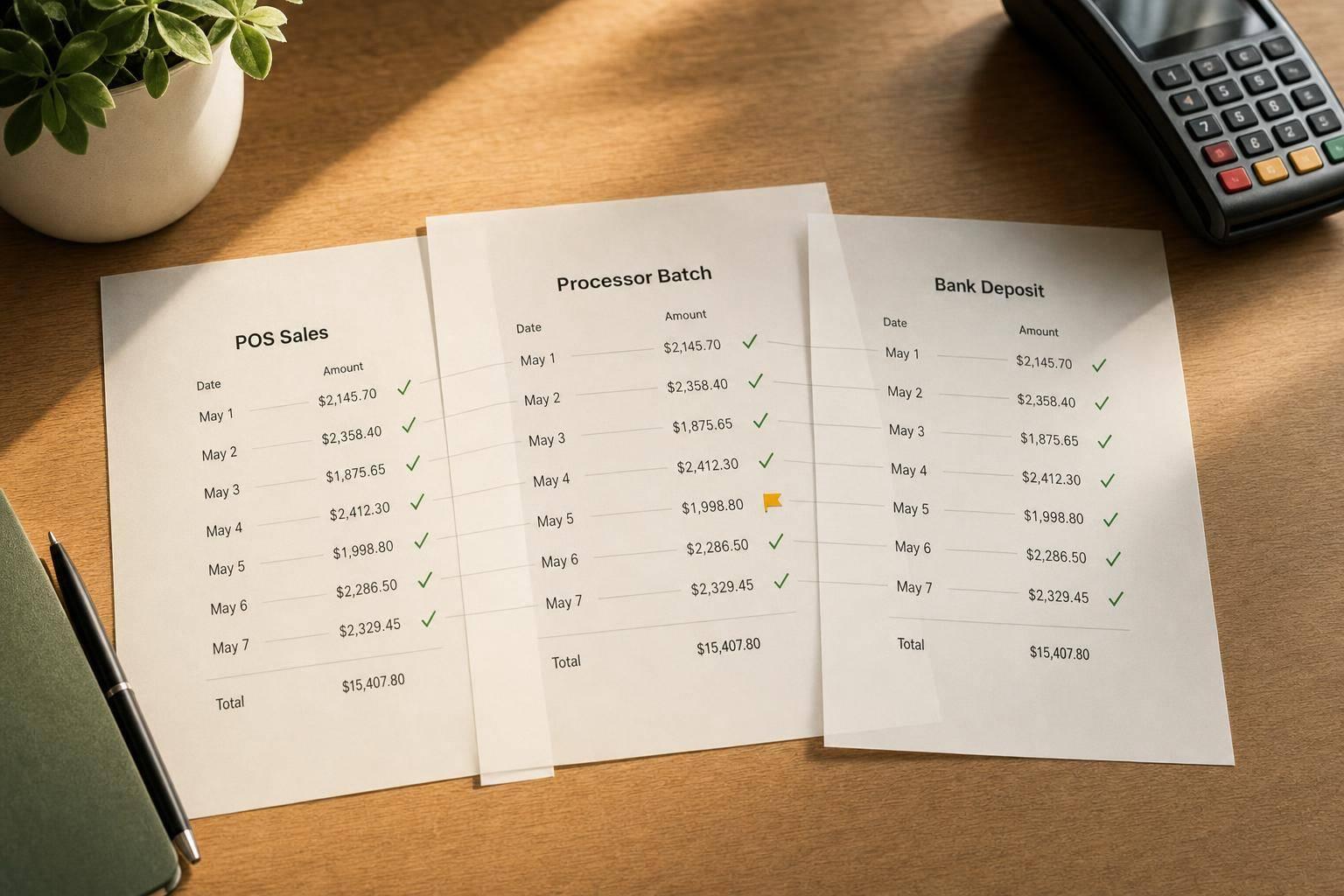
If your POS sales, processor batches, refunds, and bank deposits do not match each day, your books can drift fast. In some multi-store retail setups, monthly cash variances can reach $12,000 when reconciliation is inconsistent.
I’d boil the process down to this: match gross sales by tender, tie card batches to processor reports, tie net deposits to the bank, and log every difference with a reason code. That helps me separate normal timing gaps from actual errors like fee deductions, chargebacks, refunds posted later, cash shortages, or tender mapping issues.
Here’s the whole article in plain English:
A simple rule I’d use: do the match daily, not at month-end. That keeps timing items visible, cuts manual cleanup, and makes audit support much easier.

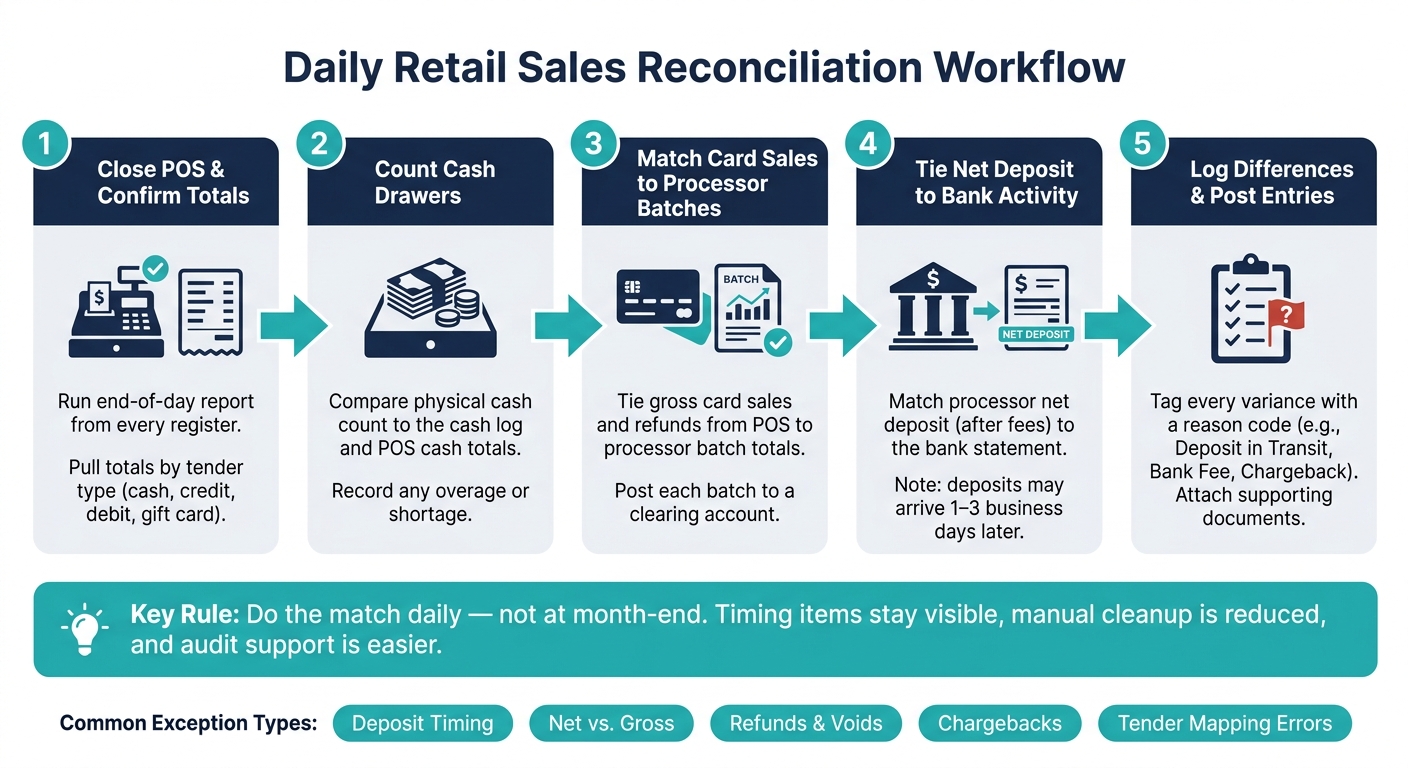
Daily Retail Sales Reconciliation Workflow: 5-Step POS Close Process
Run the close in this order: POS, cash, card batches, bank deposit, exceptions.
Start by running the end-of-day report from every register and pulling totals by tender type. Then request a daily settlement report from your processor that shows batch totals by tender type, plus fees [1]. That report gives you the detail you need for Step 2.
Count the cash drawer and compare the physical count with the cash log and the POS cash totals. If the numbers don’t line up, the difference is your overage or shortage for the day.
For card transactions, match gross card sales and refunds from the POS report to the processor batch totals. After that, tie the processor’s net deposit - after fees - to your bank activity. A clean way to handle this is to post each batch to a clearing account first, then clear it when the bank deposit posts. That way, the gap between the sale date and the deposit date stays visible [1][2].
Use standard reason codes - "deposit in transit", "bank fee", or "chargeback" - so anyone reviewing the log can see the status right away [1][2]. For small adjustments, post them with a short memo and attach a supporting statement image [2]. If an item still isn’t resolved, leave it in the clearing account until someone investigates and clears it.
| Exception Type | Investigation Step |
|---|---|
| Overage or Shortage | Compare cash log to physical count |
| Net Deposit Variance | Match gross sales and refunds to processor batch totals |
| Refunds/Chargebacks | List open items by date and processor; confirm clearing date |
| Timing Delays | Scan bank activity for the following 1–3 business days |
| Fees | Compare statement fees to ledger expense accounts |
These exception types are the main places automation can cut down on manual work.
Most daily close exceptions come from the same handful of issues. If you know where to check first, you can save a lot of tedious line-by-line review.
The most common mismatch is straightforward: your POS records gross sales, but the bank posts a net deposit. Processor fees, reserves, and chargebacks reduce the amount that lands in the bank, so the two numbers often won't line up exactly.
Timing can create gaps too. Batches closed near midnight or over a weekend may not reach the bank for 48–72 hours. That leaves you with a deposit in transit. When that happens, tag the item with a reason code, check the bank feed again within three business days, and then escalate if it still hasn't cleared. Use the clearing account to separate the missing amount, then tie it back to the processor report.
After timing issues, transaction adjustments are usually next. Refunds, voids, and chargebacks often post in a different month than the original sale. That's where things can get messy fast.
Tender-code mapping errors are trickier. If a tender type is mapped to the wrong ledger account, totals by card type won't reconcile cleanly. It can look like one payment method is over while another is short, even though the problem is just bad mapping.
The table below shows where each mismatch type usually appears first and the fastest way to isolate it:
| Mismatch Type | Typical Symptom | First Place to Check | Fastest Investigation Step |
|---|---|---|---|
| Timing / Deposit in Transit | POS sales total > bank deposit for the same date | Bank statement | Tag as "Deposit in Transit" and verify clearance within 3 business days |
| Processor Fees / Net vs. Gross | Bank deposit is consistently lower than POS total by a small % | Bank statement | Compare gross amount vs. net amount on the processor report |
| Refunds / Voids | Bank deposit is lower than POS sales; credits post in a different month | Processor settlement report | Check the open refund schedule or clearing account for unmatched credits |
| Chargebacks | Unexpected deduction from a settled batch | Bank statement / processor portal | Filter by "Chargeback" reason code in the processor's daily activity report |
| Tender-Code Mapping Errors | One tender type is over while another is short by the same amount | POS daily close vs. processor batch | Compare batch totals by card type (e.g., Amex vs. Visa) between POS and processor |
These are usually the first mismatches your auto-match rules and exception alerts should flag. In plain English: if your team keeps seeing the same breaks, your software should handle those first.
The right accounting stack shouldn’t just record what happened. It should spot what doesn’t match and send it to the right person without a lot of back-and-forth. That’s the goal.
Use POS-to-accounting integrations to post sales, refunds, discounts, and taxes by tender type automatically. Live integrations send those entries to the right GL accounts, which cuts manual entry and lowers the odds of posting errors.
Then pair that with daily bank feeds that pull transactions into the accounting system each day. Now you have the two data streams needed to auto-match most deposits automatically. A clearing account helps here too. It holds processor activity until the bank deposit clears, which makes timing differences easier to track. Daily automation also shortens close cycles because the team spends less time on imports and follow-up work.
Once those connections are in place, the next job is simple: manage the exceptions instead of touching every line.
This is where exception workflows do the heavy lifting. After auto-matching is in place, the software should flag only the items that need attention, not every transaction. Good exception reporting points out unmatched deposits, missing batches, and refunds above set thresholds. Those are the same trouble spots covered in the mismatch section above: timing gaps, net vs. gross differences, open refunds, chargebacks, and mapping errors. The result is pretty straightforward - the team stays focused on unresolved items.
Reconciliation logs matter just as much as the alerts. Every unmatched item should need a reason code before it can be dismissed, such as "deposit in transit", "chargeback", or "missing batch." Manual journal entries should also require a memo and an attachment. And after a period is closed, period locking should block edits unless there is controller-level approval.
The table below compares the tool categories most relevant to retail reconciliation:
| Tool Category | Benefits | Limitations | Ideal Use Case |
|---|---|---|---|
| POS-Accounting Integration | Eliminates manual entry; reduces human error; captures taxes/discounts automatically. | Risk of silent failures if API credentials expire. | Retailers with high transaction volume across multiple tenders. |
| Bank-Feed Automation | Real-time visibility; daily matching; eliminates manual CSV imports. | Requires daily monitoring to ensure feeds haven't disconnected. | High-volume transaction matching. |
| Reconciliation Workflows | Standardizes exception handling; provides clear audit trails via reason codes. | Requires disciplined daily or weekly cadence. | Managing complex settlements and chargebacks. |
Sometimes the workflow is mapped out, but the setup still falls apart in practice. In many cases, the issue comes down to bad mappings or thresholds that trigger the same exceptions again and again.
That’s where outside help can make sense. Phoenix Strategy Group helps growth-stage retailers set up POS-to-bank workflows, GL mappings, and reconciliation controls so the automation runs cleanly from day one.
Once the daily close follows a standard process, reconciliation stops feeling like a month-end fire drill. It becomes part of the daily rhythm. Matching transactions each day and clearing accounts on a steady basis helps cut variances, shorten close cycles, and surface repeat import errors before they pile up.
That kind of consistency changes reconciliation from a back-office chore into a tool managers can actually use.
When you match POS data, processor records, bank deposits, and refunds, you get a cleaner view of cash flow and a faster path to closing the books. For growing retailers, that means faster closes, cleaner cash flow, and stronger reporting.
Keep the daily close simple: match daily, flag exceptions, and keep a one-page summary.
Start by checking that your bank feeds are active and that imports from your POS and payment systems are flowing in as expected. Then review and fix any unmatched transactions.
Handling this early helps keep your records accurate, supports reliable reporting, and cuts down on manual work at month-end.
Use a clearing account for each payment processor or gateway. Record the sale in that clearing account first, not straight to cash.
Then, when the deposit hits your bank, record a transfer from the clearing account to the bank account. This keeps deposits in transit visible until they clear. It also makes daily matching and discrepancy tracking a lot easier.
Use a clearing account when each payment processor or marketplace needs its own account. That gives your team a clean way to reconcile batch payouts without mixing everything together.
A simple way to handle it: post daily settlement reports to that clearing account using the batch totals. Leave those amounts there until the cash lands in your bank account.
Once the deposit arrives, release the batch totals to revenue. This keeps your records accurate and makes reconciliation much easier.