Published on
September 26, 2025

Cash flow automation means connecting your bank accounts, invoices, and bills to software that updates your cash position and forecast automatically, instead of someone rebuilding a spreadsheet every Monday morning. The payoff: you see problems, or opportunities, days or weeks before a static report would show them, and your team spends hours on analysis instead of data entry.
A cash flow statement answers one question: how much cash came in and went out of your business this period, and why [1]. If you've never automated any part of this, you're not alone, but the stakes are real. Eighty-two percent of small businesses that fail point to cash flow problems as the cause [2]. That's not a rounding error. It's the reason this topic gets searched more than almost any other finance question growth-stage founders ask.
What's different heading into 2026? Two things. First, "AI-native" is now a real feature, not a buzzword — platforms like Forwardly build instant payments and smart scheduling around AI from the ground up rather than bolting a chatbot onto an old tool [3]. Second, multi-entity automation has matured: tools now pull consolidated trial balances across entities and apply intercompany elimination logic before the forecast model runs, which used to require a finance team working overtime at month-end [4]. If you run more than one entity, that alone might be worth switching tools for.
The fastest path to automating cash flow follows a specific order: sync your bank feeds first, automate accounts receivable follow-up second, route accounts payable approvals third, then build a rolling 13-week forecast, and only then layer in scenario modeling. Skip steps and you end up automating chaos, which just means you get bad numbers faster.
This order matters because each step depends on the one before it. A forecast built on manual AR data is only as good as whoever remembered to check for late payments that week. Companies that get a true rolling 13-week forecast running with real AR data see a measurable payoff: one 2024 AFP study found it cut cash shortfall surprises by 38% [4]. That's the kind of number that changes how a board thinks about your finance function.
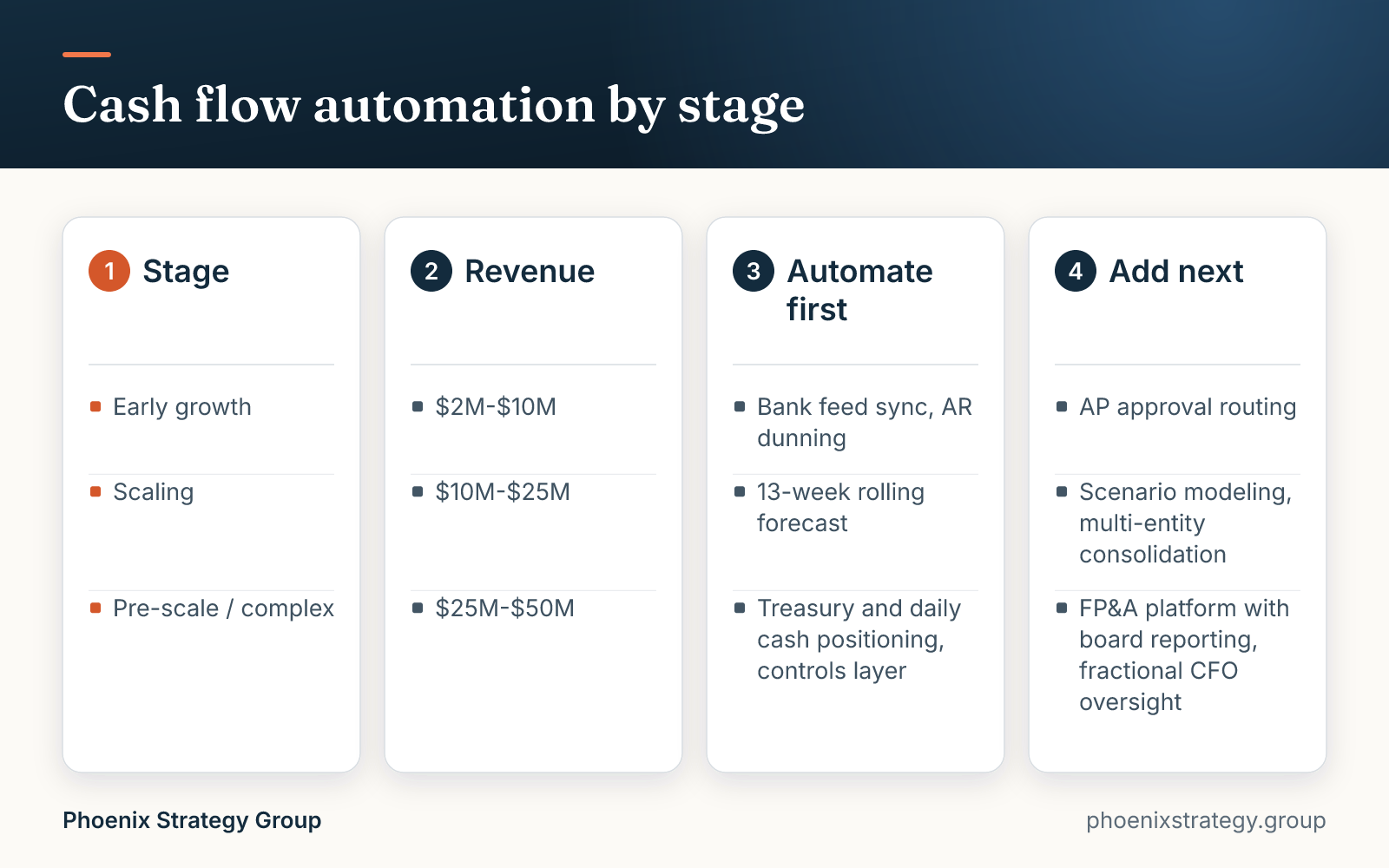
What you should automate first depends entirely on your revenue stage and how much cash risk you're carrying, not on which tool has the flashiest demo. A $3M company and a $40M company have completely different failure modes, so their automation priorities should look different too.

At $2M-$10M, you're usually one slow-paying customer away from a real problem. Priority one is visibility: bank feed sync and AR dunning. You don't need scenario modeling yet. You need to stop finding out about a cash crunch the week it happens.
At $10M-$25M, you likely have more than one bank account, maybe more than one entity, and a finance person (or a fractional CFO) who's tired of rebuilding the forecast in Excel every Friday. This is where a real rolling 13-week forecast earns its keep, and where AP approval routing starts mattering for controls, not just speed.
At $25M-$50M, you're probably managing multiple entities, more complex payment terms, and a board that wants scenario-level answers, not just a cash balance. This is where treasury automation, meaning daily cash positioning across accounts, and a dedicated FP&A platform with audit trails become worth the cost, and where a part-time or fractional finance lead usually needs to own the model even if software runs it.
The best cash flow automation tools fall into three categories: AR/AP automation, FP&A or forecasting platforms, and treasury or bank aggregation tools. Most growth-stage companies end up needing a piece of all three, not one tool that claims to do everything.
Vendor lists that rank tools one through ten usually bury this point: these aren't competing products, they're different layers of your stack. An AR/AP tool doesn't forecast well. A forecasting platform doesn't pay your vendors. Here's how the categories break down, without picking a winner for you.
| Category | What it automates | Examples | Typical price tier |
|---|---|---|---|
| AR/AP automation | Invoice capture, approval routing, bill pay, collections reminders | QuickBooks Online, Bill.com, Forwardly [3] | $45-$300+/month, or volume-based |
| FP&A / forecasting platforms | Rolling 13-week forecasts, scenario modeling, variance analysis | Fathom, Jirav, Spotlight Reporting, Cube, Mosaic, Vena [4] | $39-$299/month per client bundle up to $1,000+/month enterprise |
| Treasury / bank aggregation | Daily bank feed sync, cash positioning across accounts, multi-entity consolidation | Direct bank APIs, ERP treasury modules (NetSuite, Sage Intacct) | Often bundled into ERP or FP&A tool; custom pricing |
Here's the part most comparisons skip: how these tools plug into what you already run. If you're on QuickBooks Online, Bill.com and Forwardly both sync natively and avoid duplicate entry [3]. NetSuite and Sage Intacct shops have more options but also more ways for things to break; the most common failure is stacking two point tools that both try to own reconciliation, which creates duplicate entries and a cash balance that doesn't match either system. Before you add a second tool, ask one question: which system is the single source of truth for cash? If you can't answer that in one sentence, don't add the tool yet.
Automating cash flow pays for itself through three levers: fewer staff hours spent on manual data entry and reconciliation, fewer missed early-payment discounts and late fees, and a forecast accurate enough that you stop making decisions on bad information. For most growth-stage companies, the math works within months, not years.

Manual invoice processing costs $10 to $22 per invoice; semi-automated workflows bring that to $3-$5, and full automation can push it under $1 [5]. On $10 million of annual payables with standard 2/10 net 30 terms, missing early-payment discounts because nobody tracked them in time costs $140,000 to $160,000 a year [5]. That's real money sitting on the table, not a hypothetical.
Consider a $15M services company running its cash forecast in a spreadsheet, rebuilt by one controller every Monday. Companies that automate the pull of AR, AP, and bank data into a rolling model report the same monthly forecasting work dropping from about 4.2 hours to 0.4 hours per month of hands-on time once the automation is set up, a reduction worth roughly $5,000 a month in labor at typical finance team rates [4]. Layer in accounts receivable automation and days sales outstanding typically drops too; AR automation can cut DSO by up to 30% and reconciliation work by up to 90% [6]. For a $15M company collecting cash a week or two faster, that's meaningfully more cash sitting in the bank at any given time, not just fewer hours spent chasing it.
ChatGPT and similar AI tools can draft a cash flow statement from numbers you give them and can summarize trends in plain English, but they can't reliably build one from your actual books. They don't pull live bank data, can't guarantee a clean audit trail, and have no way to verify that the numbers you paste in are complete or correct [7].
The failure points are specific. Multi-entity businesses need consolidated trial balances with intercompany eliminations applied before any forecast means anything, and a generic chatbot has no access to that data and no logic to apply it [4]. AI chatbots also don't collect information from reliable sources on their own; they work with what you feed them, and if that's outdated or wrong, the output looks confident and is still wrong [7]. That's a dangerous combination for a document a lender or board member might rely on.
Where AI genuinely helps: drafting a first pass of commentary on a forecast someone built properly, summarizing a long variance report into a few bullet points for a board update, or catching an obviously wrong number before someone else does. Treat it as a fast writer, not your bookkeeper. For actual forecasting, dedicated platforms built for the job, like Fathom and Jirav for rolling 13-week forecasts and Spotlight Reporting for Xero-first shops, are built around real accounting data with audit trails, which is what a chatbot can't offer [4].
Before you let software touch a bank account, you need approval thresholds, dual authorization above a set dollar amount, and an audit log that shows who approved what and when. Automating payments without these controls doesn't just risk error, it creates a textbook fraud opportunity.

Occupational fraud costs businesses an estimated $5 trillion globally every year [8], and a lot of that happens in exactly the gap automation creates: someone sets up a vendor, approves the bill, and pays it, all without a second person ever looking at it. The standard control is requiring two approvals for payments above a defined threshold [8]. Pick a number that makes sense for your cash position, whether that's $1,000 or $25,000, and build it into the workflow before you go live, not after.
Segregation of duties matters even more once things move fast. The person who adds a new vendor to the system shouldn't be the same person who approves payments to that vendor. Most AP automation tools let you build this in with role-based permissions, but the mistake is assuming the software handles it by default. It doesn't. You have to configure it.
Don't automate cash flow yet if your chart of accounts is a mess, your month-end close is inconsistent, or you don't have one system everyone agrees is the source of truth for cash. Automation speeds up whatever process you already have, including a broken one.
Once your process is clean enough to automate, the next decision is build vs. buy vs. bring in help. Software alone works when your stack is simple, your entity count is one, and someone on the team owns the forecast. It stops working when the forecast needs judgment: which assumptions to trust, how to model a new product line, what to tell the board when actuals miss. That's a people problem, not a software gap.
A fractional CFO typically runs $175-$450 an hour, or $3,000-$15,000 a month depending on scope, with companies in the $1M-$10M range often paying $200-$300 an hour [9]. That's not cheap, but compare it to the cost of a forecast nobody trusts, or a fraud exposure from a control gap nobody caught. If you're past the "just needs a tool" stage and into "needs someone who's done this before to set it up right and keep it honest as you scale," that's the signal to bring in finance leadership alongside the software, not instead of it. If you'd rather not build this by hand, Dear CFO builds a rolling cash forecast straight from your QuickBooks, which is the kind of foundation a fractional CFO can build judgment on top of.
Cash flow automation isn't one purchase decision, it's a sequence. Sync your bank feeds, automate AR follow-up, route AP approvals, build a real rolling forecast, then add scenario modeling, in that order and not before your books are clean enough to trust. The tools matter less than most comparison posts suggest; the order you adopt them in, the controls you build around payments, and whether someone with real judgment owns the forecast matter more. Get those right and the software just makes you faster. Get them wrong and it makes your mistakes faster too.
Not reliably on its own. ChatGPT can draft the format and summarize cash movements you describe to it, but it can't pull live bank or accounting data, verify multi-entity consolidations, or guarantee an audit trail [7]. Use it to draft commentary or explain a statement someone else built correctly, not to generate the real thing from your books.
Start with bank feed sync so your cash position updates automatically, then automate AR dunning and AP approval routing, then build a rolling 13-week forecast, and finally add scenario modeling once the forecast is reliable. Doing these in order matters more than which specific tool you pick for each step.
If you're asking this in the context of cash flow, the honest answer is that automation doesn't generate revenue directly, it frees up cash and time you already have. Automating AR collections gets you paid faster, automating AP lets you capture early-payment discounts, and automating your forecast stops cash problems from blindsiding decisions that cost you money.
There isn't one best tool, there's a best stack for your situation. Most growth-stage companies need an AR/AP automation tool (like QuickBooks Online or Bill.com), a forecasting platform (like Fathom, Jirav, or Cube), and sometimes a treasury layer for daily cash positioning, rather than a single platform claiming to do all three well.
Generating cash flow and automating its tracking are different problems. The fastest real levers are collecting receivables faster through tighter terms and automated dunning, negotiating better payment terms with vendors, and cutting the gap between delivering work and invoicing for it. Automation supports all three but doesn't replace the underlying sales and collections discipline.
Among dedicated platforms, Fathom and Jirav are built specifically around automated rolling 13-week forecasts, and Spotlight Reporting is a common choice for businesses on Xero [4]. General-purpose AI chatbots aren't built for this; they lack the live accounting data connection and audit trail these dedicated tools provide.

About the author
Partner, Phoenix Strategy Group
Ethan Lu is a Partner at Phoenix Strategy Group, where he works as a fractional CFO helping founder-led companies maximize their exit value. He currently oversees more than $200M in client enterprise value and has been part of multiple eight-figure exits. Before PSG he was an asset manager and investor for a San Diego family office, where he sat on the investment committee for more than $1B in assets. A data scientist by training, he holds a B.S. in Mathematics with a minor in Accounting from UC San Diego.
Talk to a PSG CFO about your numbers
Phoenix Strategy Group does CFO work for growth-stage companies.
Schedule a call