Published on
August 3, 2026


If I’m reviewing a manufacturing cyber budget, I’d tie every dollar to four cost buckets: downtime, recovery, insurance gaps, and compliance. For U.S. manufacturers, that matters fast. A cyber event can stop production, and the average data breach cost hit $4.45 million.
Here’s the short version of what I’d check first:
A simple way to look at it: if I can’t link cyber spend to plant uptime or loss reduction, I’d question it.
| Review Area | What I’d Want to Know | Why It Matters |
|---|---|---|
| Asset inventory | What is missing or untracked? | Unknown assets turn into blind spots |
| Downtime costing | What does 1 hour offline cost? | Helps set budget order |
| Recovery planning | What will a full plant restart cost? | Cleanup is only part of the bill |
| Vendor review | Do contracts shift risk back to us? | One supplier issue can stop production |
| Insurance review | What losses are not covered? | Policy limits may not match plant losses |
| Compliance split | What is required now vs. recurring? | Keeps budget owners clear |
| KPI review | Are controls cutting cost and delay? | Helps move money where risk is highest |
So the core message is simple: I’d treat cyber budgeting as a finance control process, not just an IT line item.
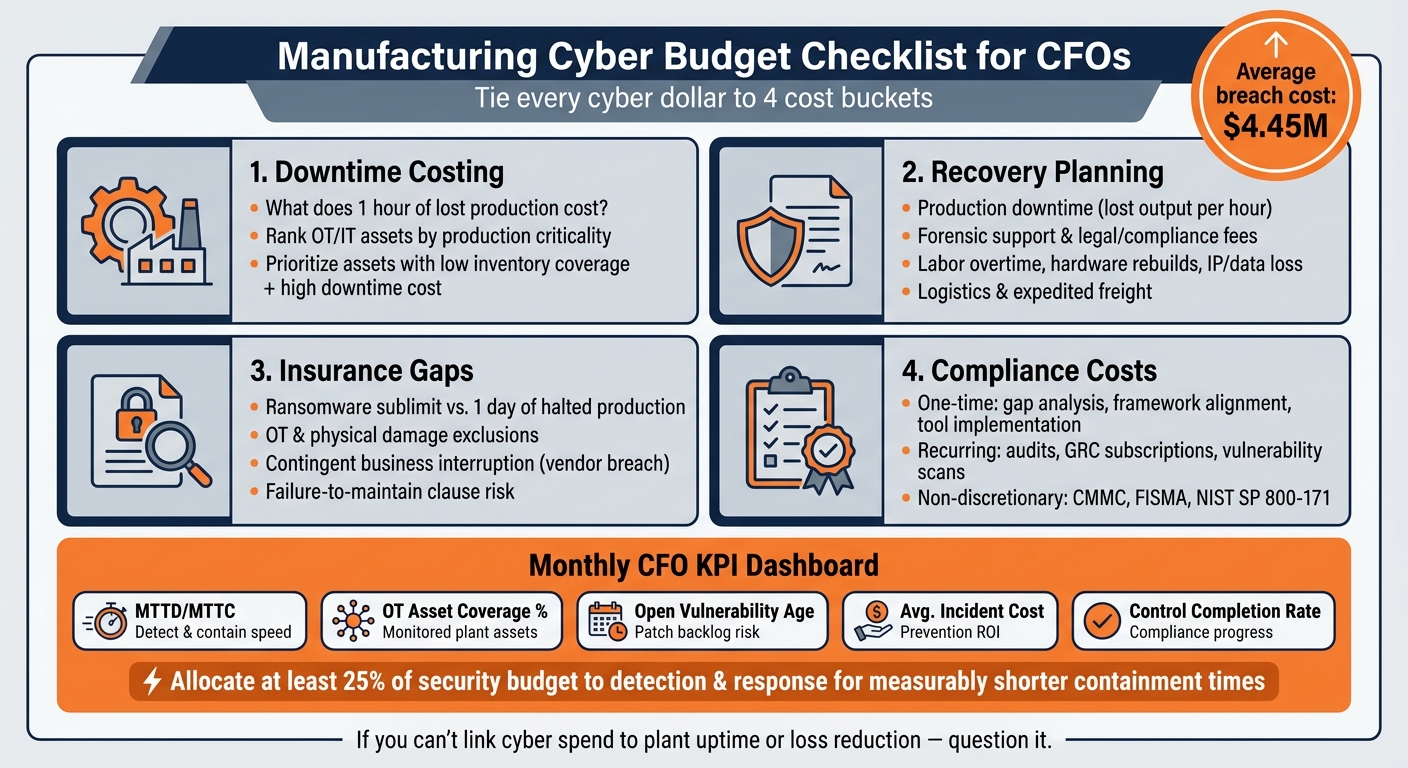
Manufacturing Cyber Budget: 4 Cost Buckets Every CFO Must Track
Use the inventory to rank assets by production criticality, downtime cost, and control coverage. This gives you a baseline, so you can sort assets by production impact before you assign spend.
Track spend across people, technology, process, incident response, and governance. Tag assets by criticality so each budget line ties to a specific risk [1].
On the technology side, include servers, endpoints, PLCs, industrial networking gear, cloud workloads like AWS, Azure, and GCP, plus connected devices such as sensors. Also include third-party managed services, such as MSSPs, MDR providers, and vendor security assessment platforms [1].
OT devices often ship with default passwords and weak update paths, which creates direct production risk. Put simply, OT gaps like default passwords and weak update paths can turn into direct downtime risk [2].
Once you have the inventory, check whether current spend covers the assets and control baselines you need. Then map each gap to a control and a budget owner. That way, every missing control has a name, a cost, and someone responsible for fixing it.
Use the table to separate critical gaps from lower-priority exposures:
| Asset Category | % Inventoried | Annual Cyber Spend | Downtime Cost ($/hour) |
|---|---|---|---|
| Critical OT / PLCs | - | - | High (production halt) |
| IoT / IIoT Devices | - | - | Moderate–High |
| IT Endpoints | - | - | Moderate |
| Cloud Workloads | - | - | Moderate |
| Shadow IT | - | - | Variable |
Prioritize rows with low inventory coverage and high downtime cost. Fund those gaps first.
Next, test whether vendor contracts and recovery plans cover the highest-cost gaps.
Vendor contracts and recovery planning often get missed. That happens because cyber costs don't stay in one lane. They spill into operations, legal, finance, and plant leadership. Use the asset inventory from Checklist 1 to spot the vendors that could drag out downtime or slow recovery.
Pull every active contract for managed security providers, cloud vendors, and plant technology suppliers. Then review each one with a few plain questions in mind:
Look closely at audit rights and security clauses. A breach at a single supplier can stop the full production line or open a path into the main network [3]. If your contract doesn't give you the right to audit a vendor's security posture, then you're taking on risk you can't fully see.
Also check the service-level terms. A generic uptime SLA sounds fine on paper, but it won't help much if a vendor's hacked system shuts down your line. You need security and recovery commitments spelled out in the agreement.
Ransomware can stop production, lock financial files, and disrupt order processing and collections.
Before an incident happens, map each recovery cost to a finance owner and GL bucket. That way, when things go sideways, your team isn't scrambling to decide where the money goes.
| Recovery Cost Category | Impact Description | Budget / GL Considerations |
|---|---|---|
| Production Downtime | Line stoppage; lost output per hour | Operational Expense / Revenue Loss |
| Forensic Support | Third-party breach investigation | Incident Response Retainer |
| Logistics & Storage | Storage and expedited freight for halted shipments | Supply Chain / Freight Out |
| Legal & Compliance | Breach notification, fines, and counsel | Legal Professional Services |
| Labor Overtime | Manual workarounds and technical rebuild | Payroll / Manufacturing Overhead |
| Hardware Rebuilds | Replacing sabotaged or failed OT hardware | Capital Expense |
| IP & Data Loss | Theft of proprietary designs or customer specs | Intangible Asset Impairment |
After vendor and recovery costs, the next step is simple: check whether your policy covers the losses your contracts and internal controls still leave on the table.
If you run a 24/7 production operation, your business interruption limits need to match what a day of downtime actually costs you. That’s where many manufacturers get caught off guard.
Four policy terms cause most of the trouble:
Here’s a plain test: compare your ransomware sublimit to one day of halted production. If the sublimit is lower, part of that loss is uninsured.
Once you know where the gaps are, split required compliance costs from optional projects.
Treat customer, industry, and regulatory compliance as non-discretionary budget. And don’t lump everything into one bucket. Keep one-time project costs separate from recurring GL expense so finance, security, and operations can see what they’re paying for.
| Category | One-Time Cost | Recurring Cost |
|---|---|---|
| Assessments & Audits | Initial gap analysis, NIST SP 800-30 risk assessment | Annual FISMA/CMMC audits, quarterly vulnerability scans |
| Governance & Policy | Policy development, framework alignment (ISO 27001) | GRC tool subscriptions, policy reviews and updates |
| Technology & Tools | Infrastructure hardening, tool implementation | Software licenses, cloud security subscriptions |
Make this split now so your monthly budget reviews can track spend by owner and by purpose.
Once insurance and compliance costs are mapped out, a monthly CFO review helps move budget toward the biggest risk gaps.
The aim is a short dashboard your finance team can scan without needing a security background. Keep it tight. Each KPI should tie back to the same OT assets, vendor risk, recovery costs, and insurance gaps already flagged in the earlier checklists.
| KPI | What It Measures | Finance Use |
|---|---|---|
| Mean time to detect and contain (MTTD/MTTC) | How quickly a threat is found and stopped | Longer times signal higher plant downtime and incident cost |
| OT Asset Coverage % | Share of inventoried plant assets covered by monitoring | Low coverage means unmonitored OT with no budget assigned |
| Age of Open Vulnerabilities | How long unpatched issues remain open | Older backlogs point to higher-cost emergency remediation |
| Average Incident Cost | Total incident spend divided by incident count | Tracks whether preventive and detection tools are delivering ROI |
| Required-Control Completion Rate | Progress against required frameworks and required spend targets | Shows gap closure against non-discretionary compliance obligations |
There’s a clear benchmark here: organizations that direct at least 25% of their security budget toward detection and response show measurably shorter containment times [1]. If your monthly review shows that share dropping below 25%, treat it as a budget shift signal, not just a note for the security team.
Put simply, these metrics should guide where next month’s dollars go.
Keep the meeting to 30 minutes. Use five phases:
The key output is the reallocation call. If MTTD/MTTC is going up, move budget toward detection and response. If OT asset coverage is below target, fund that gap before the next audit. That way, budget choices stay tied to live risk instead of year-end assumptions.
Cyber risk in manufacturing is a finance problem. Every gap in coverage, contracts, recovery, insurance, or compliance comes with a dollar cost.
Production downtime is often the most expensive hit.
That’s why OT asset coverage and plant recovery costs should come first. If a plant goes down, the meter starts running fast.
After production continuity, look at the next big cost centers: uninsured loss exposure, vendor contract terms that leave incident costs on your side, and compliance duties tied to active contracts. For manufacturers with federal or DoD work, a NIST SP 800-171 gap can put contracts at risk.
Use that ranking to decide where the next budget shift should go.
Use the monthly KPI review to drive budget moves. Tie that review straight to spending decisions. Give the CFO a standing agenda item to move dollars across OT monitoring, vendor controls, recovery readiness, and insurance.
Run the annual review at the same time as IT planning and major contract renewals. Insurance renewal dates are a natural trigger. Use them to check whether documented control improvements have earned access to lower premium tiers. Manufacturers with documented security programs and measurable controls are the ones securing better coverage terms [1].
Make cyber spend a finance-controlled process.
Calculate downtime cost per hour by adding up the direct and indirect financial hits that happen during an outage.
Start with revenue loss compared with normal operations. If the business usually brings in $25,000 per hour and an outage cuts that to $5,000, the hourly revenue loss is $20,000. Then add productivity losses. That includes paid employee time that can’t be used as planned, delays across teams, missed output, and any extra labor needed to work around the issue.
Recovery costs matter too, and they often pile up fast. These can include:
Some costs are harder to pin down, but they still matter. Lost customer loyalty, churn, brand damage, and future sales impact can all outlast the outage itself. Those effects may not show up on the same day, but they can still hit revenue in the weeks or months that follow.
To make the estimate more useful, model several disruption scenarios instead of relying on one number. For example, compare a short outage with limited customer impact, a multi-hour event that stops key systems, and a severe incident that brings legal, regulatory, and public fallout. That gives you a range of hourly downtime costs rather than a single guess, which is usually a better way to plan.
Cyber insurance often doesn't cover the full loss. And if policy rules aren't followed, a claim can be denied. That can happen over things that sound small in the moment but matter a lot later, like missing documentation, late notice, or using vendors the insurer didn't approve.
Some costs also fall on the company no matter what. Common out-of-pocket expenses include deductibles, uninsured losses, lost productivity, reputational damage, and possible fines.
For CFOs, the key step is simple: compare the actual cost of an incident against the policy's limits. That side-by-side view makes coverage gaps much easier to spot.
Each month, CFOs should review compliance metrics to make sure they still line up with broader business goals and match current regulations.
They should also refine forecasts, compare actual downtime or incident costs against pre-incident projections, and update cash flow models to account for possible disruptions. Monthly planning, backed by weekly tracking, helps teams stay agile and keep the business financially healthy.