Published on
August 4, 2026


If your finance team gets training before it gets written rules, people will guess when money or data is on the line. That is the main risk this article addresses.
I’d sum it up like this: before anyone gets access to banking, ERP, payroll, AP, or finance files, I’d want written policy rules in place for ownership, training scope, passwords, MFA, payment approvals, device use, vendor checks, incident reporting, and recordkeeping.
The article makes the case with hard numbers. The FBI logged 21,442 BEC complaints and $2.77 billion in losses in its 2024 IC3 Annual Report. AFP’s 2025 survey found that 74% of organizations faced BEC in the prior year. For smaller U.S. companies, that means informal finance habits can get expensive fast.
Here’s the short version of what matters most:
A few points stand out. The article pushes for MFA on all finance-critical systems, two-person approval for payment activity, and fast incident escalation - including reporting suspected payment fraud or data exposure within 15 minutes. It also ties policy records to access, so if acknowledgment is missing, access should not be granted.
If I were reading this for action, my takeaway would be simple: approve the rules first, then train people on those rules. That keeps finance controls clear, testable, and easier to follow under pressure.
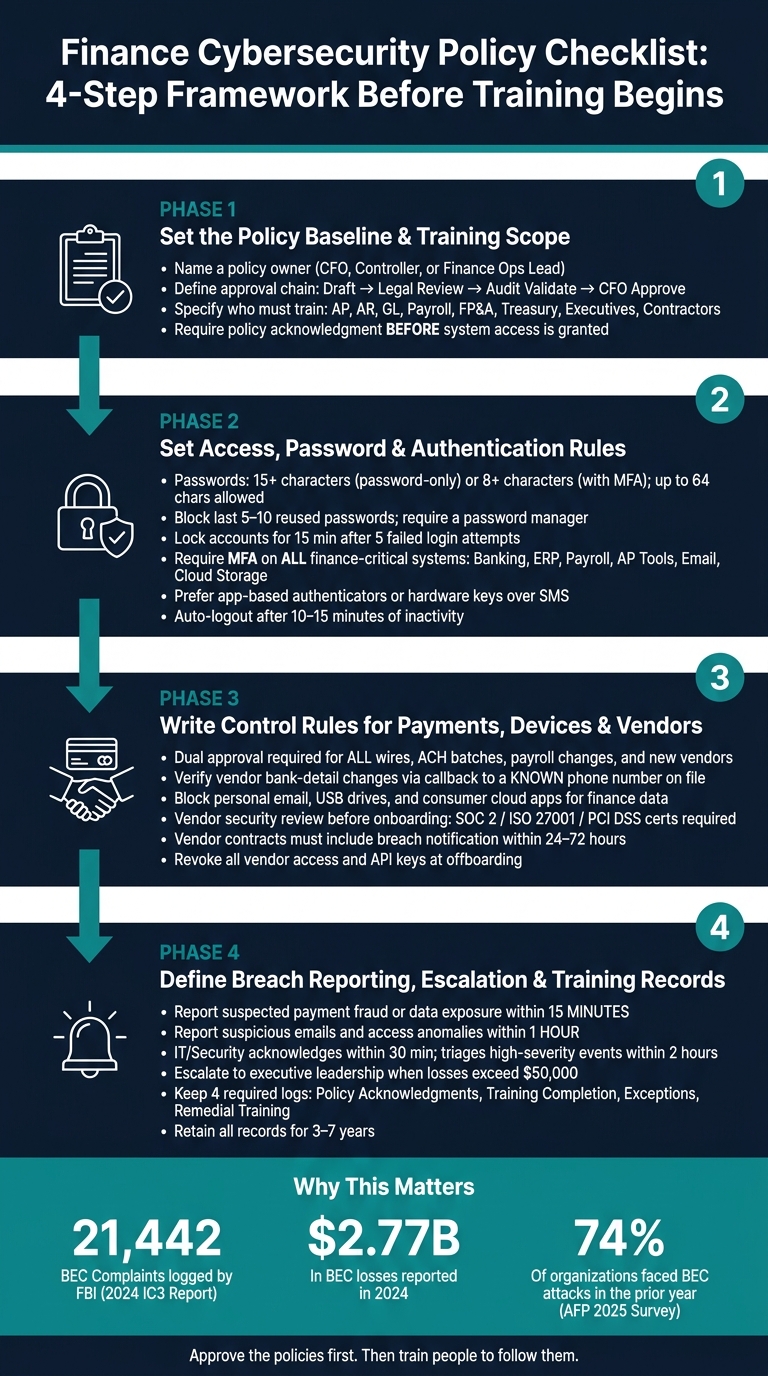
Finance Cybersecurity Policy Checklist: 4-Step Framework Before Training Begins
Start with a written policy that spells out scope, ownership, and coverage. If people finish training and then slip back into informal habits, it's often because nothing in writing tells them what the rules are. Once the scope is on paper, define the access rules the policy will enforce.
Every finance cybersecurity policy needs a named owner - usually the CFO, Controller, or Finance Operations lead - working with the IT or security lead. That owner is responsible for keeping the policy current, not just approving it once and moving on.
Write the approval chain directly into the policy:
| Step | Role | Responsibility |
|---|---|---|
| Draft | Finance Ops + IT/Security | Write and update policy content |
| Review | Legal/Compliance | Check regulatory and contractual requirements |
| Validate | Internal Audit | Confirm control design |
| Approve | CFO + Executive Leadership | Final sign-off on material changes |
The policy should also say that it will be reviewed at least once a year - and after a material incident, system change, or M&A event. Putting those triggers in writing helps stop the policy from sitting untouched for years while the business changes around it.
The policy must name every group that has to complete training: AP, AR, GL, payroll, FP&A, treasury, executives, contractors, fractional CFOs, and any third party with access to finance systems or data. Broad language like "all finance staff" sounds fine at first, but it leaves holes, especially when contractors or fractional providers are involved.
Training scope should match system risk. Require onboarding training before access is granted. After that, all covered roles need refresher training at least once a year, plus extra sessions after major policy changes or incidents.
Training should also fit the role. For example:
Do not issue credentials until the user acknowledges the policy. This applies to ERPs, banking portals, payroll platforms, expense tools, and shared finance drives. Use electronic acknowledgment in an LMS or HR system so you have a timestamped audit trail tied to a specific user and policy version.
General acknowledgment should apply to all users and confirm that they understand the rules for system access, payments, and reporting. Anyone who can initiate or approve payments should also complete a separate attestation. This is required in addition to the general acknowledgment.
That attestation should confirm that the user understands:
These rules set the baseline for the access controls that come next.
Once ownership and training scope are clear, often managed by fractional CFO services, the next step is simple: spell out the access rules employees must follow before they use any finance system.
Set clear password rules for finance systems. Use long passwords: at least 15 characters for password-only accounts and at least 8 characters when MFA is required. Also allow passwords up to 64 characters.[4][5][9][10]
Passphrases work better than forced character-mix rules. On top of that, reject breached, common, or easy-to-guess passwords before users can set them.[5][7][9]
Your policy should also ban password reuse across finance systems, email, and personal accounts. For finance-critical systems, block reuse of the last 5 to 10 passwords. Require a password manager, and do not allow passwords to be stored in spreadsheets, notebooks, or email.[5]
For failed logins, lock finance accounts for 15 minutes after 5 failed attempts. For finance-critical systems, send an alert to IT or security when that happens.
Password rules help, but they don't solve the whole problem.
Require MFA for all finance-critical systems.[1][3] Make it mandatory for:
When choosing MFA methods, prefer app-based authenticators or hardware security keys. SMS should be backup-only.[5][9]
Privileged accounts need tighter controls. Require stronger MFA, use separate admin accounts where feasible, and turn on extra logging.[6][8]
Then decide where those credentials can actually be used.
Write remote access rules in plain language. Require approved secure channels such as a company VPN, SSO with MFA, or zero-trust tools. Employees should not access banking or payroll systems on public or insecure Wi-Fi unless they are on a VPN.
Set session timeouts, flag unusual logins, block local downloads of sensitive finance data, and ban personal cloud storage.[2][6]
| Rule | Standard |
|---|---|
| Session timeout (banking, payroll, AP portals) | Auto-logout after 10–15 minutes of inactivity |
| Logins from outside the U.S. | Trigger alerts or require additional verification |
| File downloads to local drives | Prohibited for sensitive finance data |
| Personal cloud storage for work files | Not permitted |
For high-risk roles, do not allow banking access or payment initiation from unmanaged personal devices. If you allow limited BYOD access for lower-risk work, require full-disk encryption, an active screen lock, up-to-date OS and antivirus, and enrollment in company mobile device management (MDM).[2]
Finance documents and exports must stay in company-approved storage - not personal Google Drive, Dropbox, or a USB drive.
With access rules set, the next layer is day-to-day operations: the controls that help stop fraud and data leaks during routine finance work.
After access is locked down, payment approval becomes the next fraud barrier.
No one person should both initiate and approve a payment. Use two-person approval for domestic and international wires, ACH batches, refunds above a set threshold, payroll changes outside normal cycles, new vendors, payees, unusual amounts, and any change to vendor bank details. Set approval thresholds by payment type and dollar amount, with tighter sign-off for wires, payroll changes, and first payments to new vendors.[14][15]
Vendor bank-detail changes need extra friction. Before a change goes live, require a callback to a known contact using a phone number already on file, not the number listed in the request. Split duties so the person who updates vendor banking details can't approve the first payment to that vendor. It also helps to place a short hold on first payments to a newly changed account until that verification is documented in your system. BEC and invoice fraud cost U.S. businesses billions each year.[11][12][13]
Your policy should spell out risk-based triggers that call for extra verification even when the amount falls below a set threshold. That includes changes requested close to payment cutoffs, new bank accounts at unfamiliar institutions, rush requests from executives, or instructions sent through personal email or messaging apps. Approvals should happen inside a controlled system - an ERP workflow, bank portal, or AP automation tool - not through loose email chains. Keep approval logs and verification notes in line with your record-retention policy.
Keep finance documents inside company-managed storage and approved tools. Block personal email, consumer cloud apps, and USB transfers for vendor, payment, and payroll data.
Be specific about what tools are allowed. Name the approved email system, messaging platform, and file-sharing service, and ban forwarding bank details, W-9 forms, or payment reports to personal email or consumer cloud services. Store financial documents only on company-managed platforms with access controls. Printing sensitive files - vendor bank details, check images, payroll reports - should require a documented business reason, and printouts should be shredded when no longer needed. Don’t leave finance documents sitting on printers or desks. The FTC recommends encrypting sensitive information sent to third parties, restricting downloads, and using password-activated screen savers.[21][22]
| Control area | Stronger practice | Weaker practice |
|---|---|---|
| Payment changes | Out-of-band callback to a known contact plus second approval | Accepting email instructions at face value |
| Device security | Managed device with encryption, lock screen, and remote locking | Personal or unmanaged device with no enforceable controls |
| File sharing | Approved tools with restricted downloads and access logging | Ad hoc sharing through consumer apps or email attachments |
These rules matter most when staff know how to report problems fast.
Third-party access should face the same control standard as internal payments.
Any vendor that will access financial data, process payments, or connect to your financial systems should go through a security review before onboarding. Collect a completed security questionnaire, review current compliance certifications such as SOC 2, ISO 27001, or PCI DSS for payment processors, and confirm that the vendor supports MFA, secure APIs, encryption in transit and at rest, and strong user management and access controls.[16][17][19]
Vendor contracts need specific clauses, not vague boilerplate. Cover data ownership, required security standards, breach notification within 24 to 72 hours of discovery, and subcontractor obligations.[16][19][20] You should also require vendors to provide security training to any staff who handle your financial data, and keep the right to ask for proof of that training.
The Basel Committee says organizations should perform appropriate due diligence before entering a third-party arrangement and dedicate resources to resolving due-diligence issues.[19]
Review high-risk vendors each year and revoke all access, API keys, and credentials at offboarding.[17][18]
Once payment, access, and vendor controls are in writing, the next step is simple: spell out how people report incidents and how finance logs what happened next. A control on paper won’t do much if employees freeze, guess, or send a report to the wrong place. This section sets the rules for response, escalation, and recordkeeping.
If something looks like a breach, employees should report it at once.
Reportable events fit into three main groups:
A one-page reporting matrix helps turn this from “good advice” into something people can use under pressure. Post it near finance workstations and store it in the shared drive. Keep the event groups clear, and pair each one with the first action the employee must take.
A clear escalation path keeps an incident from bouncing between teams with nobody in charge. Assign a role to each step, and set time targets for every handoff.
At the first level, the employee stops the activity if it is safe to do so. Suspected payment fraud or data exposure must be reported within 15 minutes. Suspicious emails and access anomalies should be reported within 1 hour. Send the report to the direct manager and the incident queue.
The finance manager then confirms the basic facts, alerts IT/security, and, for payment-related events, brings in the CFO's office. IT/security should acknowledge the report within 30 minutes and finish initial triage within 2 hours for high-severity events.
After that, ownership becomes more defined:
For regulated institutions, the escalation playbook should also include any regulator-notice deadlines that apply [25].
These steps should connect straight into the training and exception logs.
Acknowledgments, completion logs, exception records, and retraining files show that the policy was followed. Finance should keep four required logs [28][29]:
Policy acknowledgments should be captured through your HRIS or LMS with a timestamp and tied directly to system access. If the current acknowledgment is not on file, access should not be granted or renewed [27][30].
Track training completion by role. Use automatic reminders for upcoming deadlines, and give managers dashboards that show overdue assignments by week. Once the set deadline passes, escalate first to the department head, then restrict access until training is done [28].
Keep records for 3–7 years to cover audit and regulatory review windows [29].
Training teaches policy. It doesn't replace it.
If your rules aren't written down and approved before training starts, people fill in the gaps on their own. That can lead to mixed messages, on-the-fly decisions, and day-to-day behavior that doesn't match what IT has set up or what auditors expect.
So before anyone starts training or gets system access, make sure written policies are approved for:
Also keep completion, exception, and retraining records up to date so the program stays auditable.
Approve the policies first. Then train people to follow them.
Ownership needs to be clearly defined so people know who’s accountable and who makes the call. That kind of clarity also helps keep teams aligned instead of pulling in different directions.
An executive-level privacy champion can lead security efforts and set the tone through their own behavior. When leaders take privacy and security seriously, other teams usually follow.
For vendor risk and compliance oversight, use a cross-functional steering committee that includes procurement, IT security, compliance, and legal.
Prioritize MFA for the places that matter most:
For consistency, enforce MFA at the identity provider level. When possible, use app-based TOTP or hardware security keys instead of SMS.
Finance staff should report suspected fraud immediately once they spot it. Company policy should require quick notes on any unusual activity - like suspicious wire requests or unauthorized access - followed by an immediate report through the established IT security channel.
Some rules allow anywhere from 72 hours to 60 days for formal reporting. But internal fraud is a different story. It should be escalated within hours so the team can freeze transactions and revoke access fast.