Published on
September 8, 2026


If you want a VC fund IRR that you can trust, use dated cash flows, keep signs correct, and use XIRR for uneven timing.
I’d boil the process down like this: list every capital call, distribution, fee, and ending NAV with the right MM/DD/YYYY date and $ amount; make outflows negative and inflows positive; then run XIRR in Excel or Google Sheets. If the fund is still active, I’d add the interim NAV as the last positive cash flow on the valuation date.
Here’s the short version:
IRR works for even periods onlyXIRR works for actual dates, which is usually the right fit for VC fundsA few points matter most. First, one wrong sign can break the whole result. Second, date accuracy matters because even small timing shifts can change an annualized return. Third, IRR should not stand alone. I’d read it next to MOIC, DPI, RVPI, TVPI, NPV, and ROI so you can see both when cash came back and how much value the fund produced.
If I were setting this up for reporting, I’d keep the model simple, label every output clearly, separate gross and net cash flows, and state the valuation date and whether subscription line effects are included.
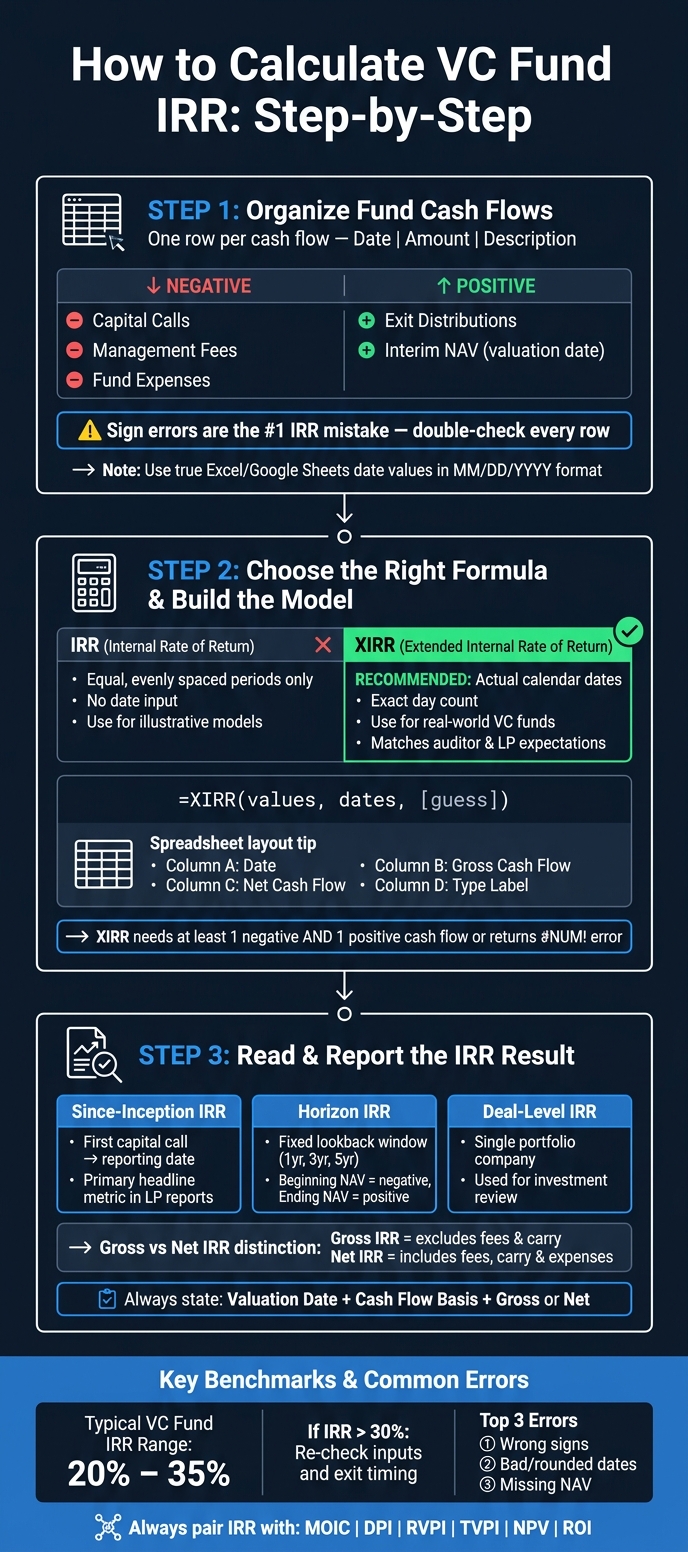
VC Fund IRR Calculation: Step-by-Step Process Guide
Before you calculate IRR, set up one row per cash flow with three columns:
Once the cash flows are clean, you can move into the spreadsheet math.
For LPs, cash outflows are negative and cash inflows are positive.
| Cash Flow Type | Sign | Example Description |
|---|---|---|
| Initial capital call | Negative | Capital call - Fund II - 03/01/2020 |
| Follow-on capital call | Negative | Follow-on call - Company X - 09/15/2020 |
| Management fee / fund expenses | Negative | Management fee Q2 2020 |
| Exit distribution | Positive | Distribution - exit Company Y - 06/30/2023 |
| Interim NAV at valuation date | Positive | Interim NAV - Fund II - 12/31/2025 |
Sign mistakes are one of the most common - and most damaging - problems in IRR modeling. If you enter a capital call as positive, or a distribution as negative, you can end up with impossible IRRs or an Excel formula error. A quick sign check before you run the formula can save a lot of cleanup later.
VC funds almost never move on a neat quarterly schedule. Capital calls happen when deals close. Distributions show up when exits happen. Sometimes those dates are separated by weeks or months, with no clean pattern.
That’s why you should enter every date as a true Excel or Google Sheets date value in MM/DD/YYYY format, not as text. This is also why XIRR is usually the right formula for VC funds.
If a fund has not fully liquidated, include the remaining net asset value (NAV) as a positive cash flow on the valuation date. Think of NAV as the fund’s ending value on that measurement date. In the spreadsheet, enter it as a positive cash flow on the valuation date.
For since-inception IRR, include every capital call and distribution from the first capital call through the valuation date. Then add NAV as the final positive row.
For horizon IRR - for example, a 3-year look-back from 01/01/2023 to 12/31/2025 - treat the beginning NAV on 01/01/2023 as a negative cash flow, and the ending NAV on 12/31/2025 as a positive cash flow. Use clear labels so you don’t mix up since-inception and horizon IRR inputs.
Next, enter these cash flows into Excel or Google Sheets and calculate IRR.
Now that the cash flow schedule is in place, it’s time to calculate the return in Excel or Google Sheets. Both tools use an iterative solver, such as Newton-Raphson, to find the rate that sets NPV to zero. Don’t do this by hand. At this stage, the main job is picking the right spreadsheet function for the dates in your model.
The IRR function (=IRR(values, [guess])) works when cash flows are evenly spaced. Each row needs to stand for one equal period, like a year or a quarter. It does not read dates.
The XIRR function (=XIRR(values, dates, [guess])) uses two ranges: one for cash flow amounts and one for the matching calendar dates. It gives you an annualized return based on the exact number of days between cash flows.
Because VC cash flows happen on specific dates, XIRR fits the schedule from Step 1. It uses the dates you already lined up, which matters more than it might seem at first glance. If timing is uneven, the result can shift in a meaningful way. For VC funds, use XIRR when dates are irregular.
| Function | Timing Assumption | VC Use Case |
|---|---|---|
IRR |
Equal, evenly spaced periods (e.g., annual or quarterly) | Useful for standardized or illustrative models; can materially misstate returns when cash flows are irregular |
XIRR |
Actual calendar dates; exact day count between flows | Accurate for real-world VC funds; aligns with auditor and institutional LP expectations; can confuse readers who expect evenly spaced periods |
One practical note: XIRR needs at least one negative and one positive cash flow. If your values range has only positive numbers, the function returns a #NUM! error [1][2][3].
Once you’ve picked the function, the next move is setting up the sheet so someone else can follow the calculation without squinting at it.
Structure matters just as much as the formula. A good model keeps gross cash flows and net cash flows in separate columns, so you can run XIRR on each one on its own.
A simple layout looks like this:
Format every dollar amount in U.S. currency style: dollar sign, comma separators, and two decimal places, like $1,250,000.00. It keeps the model easier to read for LPs and auditors, and it helps avoid formatting problems when the file moves between systems.
Use named ranges like NetCashFlows and NetDates instead of fixed references such as B2:B20 in your XIRR formulas. That small step saves headaches later, especially when the schedule grows and rows get added.
Also, label each output with plain-English names like "Fund Since-Inception Net XIRR" or "Gross Deal-Level IRR." If a number sits in a model without a clear label, people start making guesses, and that’s where mistakes creep in.
After the formula runs, the next step is reading the result correctly as gross or net IRR.
Once the spreadsheet returns XIRR, report the result with clear labels and the right assumptions. Include the valuation date, the cash flow basis, and whether the figure is gross or net.
Gross IRR excludes fund-level fees and carry. Net IRR includes fees, carry, and fund expenses. You should also state whether subscription credit line usage is included or excluded, because that choice can change the reported IRR.
After you confirm the cash flow basis, classify the result by reporting view.
The table below separates the three main IRR views:
| IRR Type | Definition | Typical Use |
|---|---|---|
| Since-Inception IRR | Fund-level annualized return from first capital call to the reporting date | Primary headline fund metric in LP quarterly reports |
| Horizon IRR | Annualized return over a fixed lookback window (e.g., 1-year, 3-year, or 5-year) | Assessing recent performance during a specific market cycle |
| Deal-Level IRR | Return generated by a single portfolio company investment | Investment review at the company level |
Use since-inception IRR for fund reporting, horizon IRR for recent performance, and deal-level IRR for investment review.
IRR is only one piece of fund reporting. It rewards speed of return, which means it can make results look stronger when only part of the fund has realized gains. That's why IRR should always appear alongside MOIC, DPI, RVPI, and TVPI, so readers can see both the speed and the size of returns.
Once the schedule is built, the biggest risk usually comes from bad inputs, not the formula itself.
The most common problems are pretty simple:
Out of these, sign mistakes show up the most. And with XIRR, small date issues can have a bigger effect than people expect.
Before you report IRR, check the inputs and then look at the result in context.
For unrealized positions, use valuation-date NAV as the terminal cash flow and calculate the figure with XIRR. When you share the result, include the valuation date and the cash flow basis. That gives people the context they need to read the number correctly.
VC IRRs often land in the 20% to 35% range. If the result comes in above 30%, it’s worth taking a second pass through the inputs and exit timing. Not because the number must be wrong, but because high IRRs can sometimes come from timing quirks or input errors.
IRR also works best when you read it next to metrics like NPV and ROI. IRR tells you the rate of return. NPV and ROI help show the dollar outcome and the total value created.
Use IRR to gauge how fast a fund turns invested dollars into returns. That makes it handy for comparing the time-adjusted efficiency of mature funds, especially after meaningful exits. Unlike simpler metrics like MOIC, IRR accounts for the time value of money.
IRR is most useful for side-by-side comparisons when funds share the same vintage year and follow a similar investment strategy. It’s less helpful early in a fund’s life, when the J-curve effect and fees can skew the picture.
Yes - unrealized investments are included in VC fund IRR when interim NAV or marks are part of the cash-flow stream. If they aren't, IRR reflects only actual capital calls and distributions.
The catch is that interim valuations are paper gains. That means IRR can look better than the cash picture if marks are too high or later get written down. For that reason, it helps to look at IRR alongside TVPI and RVPI so you can separate realized cash from unrealized value.
IRR is time-sensitive and annualized. That means it can look high when a fund returns cash fast, even if the total multiple isn't that large. A single early exit can push reported IRR up without adding much to the total amount returned.
MOIC looks at total value created. It does not factor in how quickly those returns show up.