Published on
July 28, 2026


If your HSM call sits on the user path, on-prem is usually faster and more steady. Cloud HSM can scale far more, but network hops, region distance, and traffic spikes can add delay and swing. In plain terms: on-prem tends to win on latency; cloud tends to win on easy scale and lower upfront spend.
Here’s the short version:
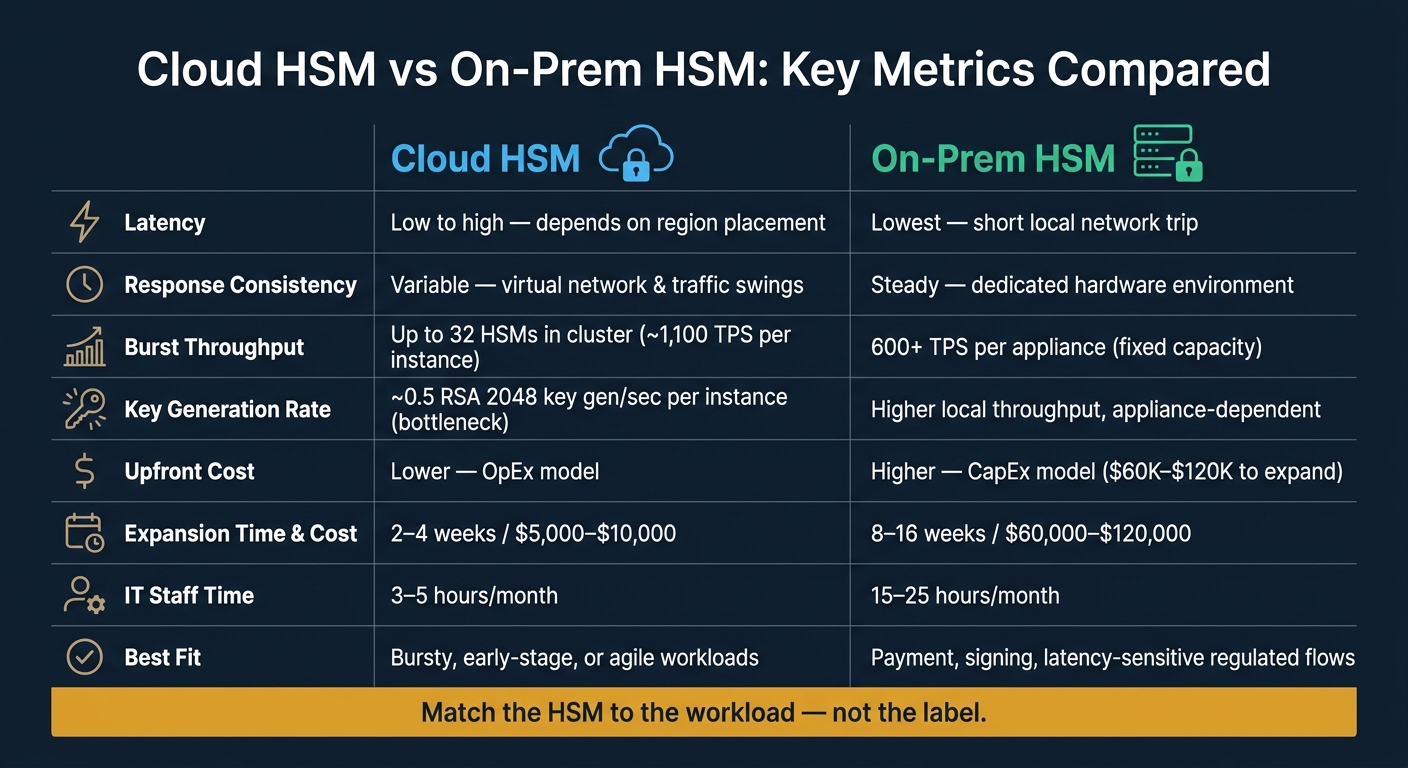
Cloud HSM vs On-Prem HSM: Key Metrics Compared
| Criteria | Cloud HSM | On-Prem HSM |
|---|---|---|
| Response time | Low to high, based on placement | Lowest when local |
| Response stability | Can swing more | More steady |
| Burst scale | High; cluster-based | Fixed until you add hardware |
| User-facing crypto | Can work, but placement matters a lot | Better fit |
| Key generation under load | Can bottleneck fast | Depends on appliance, but local access helps |
| Upfront cost | Lower | Higher |
| Long-run high-volume cost | Can keep rising with usage | Can drop per transaction after setup |
| Hardware custody | Provider-hosted | Your team controls it |
If I were choosing, I’d match the HSM to the job: cloud for bursty or early-stage workloads, on-prem for payment, signing, and other delay-sensitive regulated flows.
An on-prem HSM on the local network has very little standing between the request and the response. In plain terms, it’s a short trip. A cloud HSM adds VPC, subnet, and cluster hops, and that extra distance creates the first speed gap.
Where your application runs in relation to the HSM shapes the latency you’ll see [2]. And the spread between the best-case and worst-case setup can be large.
| Setup | Typical Latency Profile | Predictability |
|---|---|---|
| On-prem HSM, same local network | Lowest round-trip time | High - dedicated, known environment |
| Cloud HSM, same Availability Zone (AZ) | Low, but adds virtual network overhead | Moderate - shared workload variability |
| Cloud HSM, same region, different AZ | Higher than same-AZ | Lower - additional network distance |
| Cloud HSM, cross-region | Highest latency | Low - geographic distance compounds delays |
For payment authorization, transaction signing, or EMV-related flows, cross-region cloud HSM access is a real problem. The latency is not just higher - it’s less predictable, and that’s often the tougher part. A slower system you can plan for is one thing. A system that swings around from one request to the next is much harder to design around. As distance grows, latency gets harder to control.
Not every HSM task sits on the critical path. Payment signing and authorization do, so even small delays show up right away. By contrast, periodic key generation, certificate issuance, or occasional document signing usually have more breathing room, so extra latency may not cause any operational trouble.
The rule of thumb is simple:
For regulated financial workflows, on-prem HSMs give you more predictable latency than shared cloud HSMs. The next question is what happens when traffic spikes.
Latency is only part of the picture. During a settlement window, product launch, or seasonal payment rush, the big test is whether the HSM can keep pace. At that point, the question shifts from response time to how many operations it can process at the same time without lagging behind.
An on-prem HSM comes with fixed capacity. A dedicated appliance can steadily deliver 600+ transactions per second (TPS) [1], which makes planning a lot simpler because the performance profile tends to stay steady.
Cloud HSMs take a different route. They scale across multiple instances. A single instance can process about 1,100 RSA 2048-bit sign/verify operations per second, and clusters can grow to 32 HSMs, which means up to 32x aggregate capacity [3]. That kind of scale helps during demand spikes.
But there’s a tradeoff. Cloud access passes through extra network layers, which adds overhead that a local appliance doesn’t have to deal with [4]. You’re also tied to cloud-provider network health. If that slips during a peak period, your usable throughput can fall even if the cluster has plenty of HSM nodes available [5].
One detail stands out here: RSA 2048-bit key generation is the main bottleneck. A single CloudHSM instance handles only about 0.5 operations per second [3]. So if your spike includes creating new keys under load, not just signing with keys that already exist, that limit shows up fast.
Capacity alone doesn’t settle the issue. The tenancy model also shapes how steady that throughput stays when traffic jumps.
On-prem deployments are single-tenant by default. It’s your hardware, your workload, and your performance floor. AWS CloudHSM also uses a single-tenant model, with HSMs physically isolated from the provider’s infrastructure [6].
Shared HSM setups are a different story. If another customer’s workload suddenly spikes, your performance can dip. That kind of variability is often tougher to plan for than slower but steady latency. In regulated financial workflows, where throughput consistency matters just as much as raw speed, that becomes a direct operational risk.
Load test the cluster against your real burst scenarios before a live settlement window [3].
Once throughput is pinned down, the next step is cost per transaction.
Once you know the throughput, the next screen is cost per transaction. This is where the cloud vs. on-prem split gets very practical.
Cloud HSM usually follows an operating expense model. You pay subscription fees, setup fees, and managed-service fees. On-prem HSM leans hard toward capital expense. You buy the appliance up front, add redundancy modules, and pay for the physical setup around it.
So which one costs less? It depends on three things: transaction volume, how well you use the system, and how predictable demand is.
At lower volume, cloud often has the edge. It gives teams more room to move and protects cash flow. You’re not stuck paying for idle capacity, and scaling up doesn’t mean waiting on a hardware buying cycle.
It’s also faster and less expensive to expand by location. Cloud expansion usually takes 2–4 weeks and costs about $5,000–$10,000, while on-prem expansion takes 8–16 weeks and runs around $60,000–$120,000 [7].
At steady high volume, though, the math can change.
On-prem hardware has a fixed cost that doesn’t increase with each transaction. Once the appliance is installed, the cost per transaction can drop as throughput climbs. Cloud HSM keeps billing for usage, so over time the operating bill can pass the amortized cost of owning the hardware. Put simply: cloud is easier to start with, but on-prem can get cheaper when traffic stays high for long stretches.
The tricky part is that on-prem costs don’t stop with the appliance. For teams handling regulated workloads, a lot of expense sits in day-to-day operations. Running an on-prem setup takes about 15–25 IT hours per month for patching, repairs, and integration issues, compared with 3–5 hours per month for cloud-based systems [7].
Disaster recovery adds another layer. An on-prem DR setup can require $200,000 in up-front capital and $50,000 in annual costs after that [7]. Then there’s the stuff that often gets missed in early planning: power, cooling, and facility upkeep. Those line items may not show up in the first budget review, but they still hit the total bill.
Staffing matters too. On-prem deployments usually need people who know HSMs inside and out. Managed cloud services shift much of that work into the service fee. That can make total cost of ownership easier to forecast, even if the monthly cloud invoice looks higher at first glance.
For most growth-stage firms, this choice comes down to data control versus cash flow flexibility.
Cloud HSM lowers the cost of getting started and keeps capital free for other needs. On-prem gives you direct physical control over your keys and a more direct compliance path under PCI HSM v4.0 [1]. But that control comes with a price: more up-front spend, more staffing pressure, and more operational work from day one.
That’s why a hybrid setup is showing up more often. A firm might use cloud HSM for development environments and bursty workloads, then keep on-prem HSM for the cryptographic core of high-volume, regulated operations. It’s a practical middle ground. You stay nimble early, while building toward the control model regulators and enterprise buyers tend to expect.
That tradeoff sets up the final decision: speed, control, or capital efficiency.
The tradeoff is simple: on-prem HSM gives you more raw speed and tighter control, while cloud HSM gives you more flexibility and a lower upfront commitment. Neither option is better in every case. The choice comes down to which constraint matters most for your setup: latency, burst throughput, or cost per transaction.
You see that tradeoff most clearly when speed, burst load, and control run into each other in production. For payment issuance and authorization, on-prem hardware has a clear edge. That difference matters most in user-facing crypto and regulated flows, where delays and tighter handling rules can hit hard.
For growth-stage firms, the decision usually starts with money and only then moves to the technical side. Cloud HSM is often the faster, lower-commitment way to get started. It keeps capital free and lets teams scale without going through a hardware buying cycle.
Match the architecture to the workload. Use cloud HSM when agility matters more. Use on-prem for latency-sensitive operations that need tight control. The best fit comes from the workload itself, not the label.
Choose cloud HSM when you want faster setup, less work for your team around uptime and patching, and OpEx-style budgeting. For many growing U.S. companies, it’s the best place to start, especially if there’s no clear rule that says you must keep physical custody of your keys.
Go with on-prem when your policies or regulators say the keys must stay inside your company’s physical control zone.
Network distance has a big effect on HSM performance because it shapes both latency and consistency. On-premises HSMs connected over a dedicated local network will usually deliver sub-millisecond latency.
Cloud-based HSMs rely on WAN connections, and that adds round-trip time, jitter, and swings in performance caused by routing changes or multi-tenant congestion. For time-sensitive transactions, shorter, segmented connections help keep cryptographic performance more predictable.
A hybrid HSM setup can make sense when you need physical custody of highly sensitive keys but still want cloud services for scale.
The right choice comes down to your regulatory and day-to-day needs. Hybrid is most useful when you have strict data residency rules, hard physical custody requirements, or air-gapped root certificate authority workloads.
For most growth-stage companies, though, cloud HSM is the simpler place to start. Hybrid setups add more moving parts, which means more operational complexity.