Published on
September 22, 2026


If budget software can’t control data, track changes, route approvals, update forecasts, and publish the same numbers every time, it will fail public agencies.
I’d sum it up like this: government budgeting breaks when teams work across spreadsheets, email threads, and manual reports. The article points to five fixes software must handle well: one budget record, clear version history, rule-based approvals, forecast updates tied to drivers, and controlled reporting.
Here’s the full picture in plain English:
A government budget system should do more than store numbers. It should show who changed what, when, why, and what got approved. That matters when staff are building board packets, checking amendment records, or answering audit questions.
| Problem | What goes wrong | What software should do |
|---|---|---|
| Spreadsheet sprawl | Teams work from different files and mismatched data | Use one central budget record with controlled input forms |
| Weak version control | Staff lose track of the current file or approved copy | Store named budget versions and field-level history |
| Slow approvals | Requests sit in inboxes and reviews stall | Route work by role, type, fund, and dollar threshold |
| Poor forecast accuracy | Static annual numbers go stale | Reforecast using actuals, assumptions, and scenario layers |
| Limited reporting | Staff rebuild reports by hand and totals drift | Use one reporting layer with fixed definitions and export history |
| Missed deadlines | Reviews get stuck and dates slip | Add due dates, reminders, backup approvers, and escalations |
One detail stood out to me: the article ties each budgeting problem to a software design choice, not just a feature list. That’s the right frame. In public budgeting, the issue usually isn’t effort. It’s whether the system can keep records clean, enforce rules, and reproduce outputs under review.
That’s the standard this article lays out.
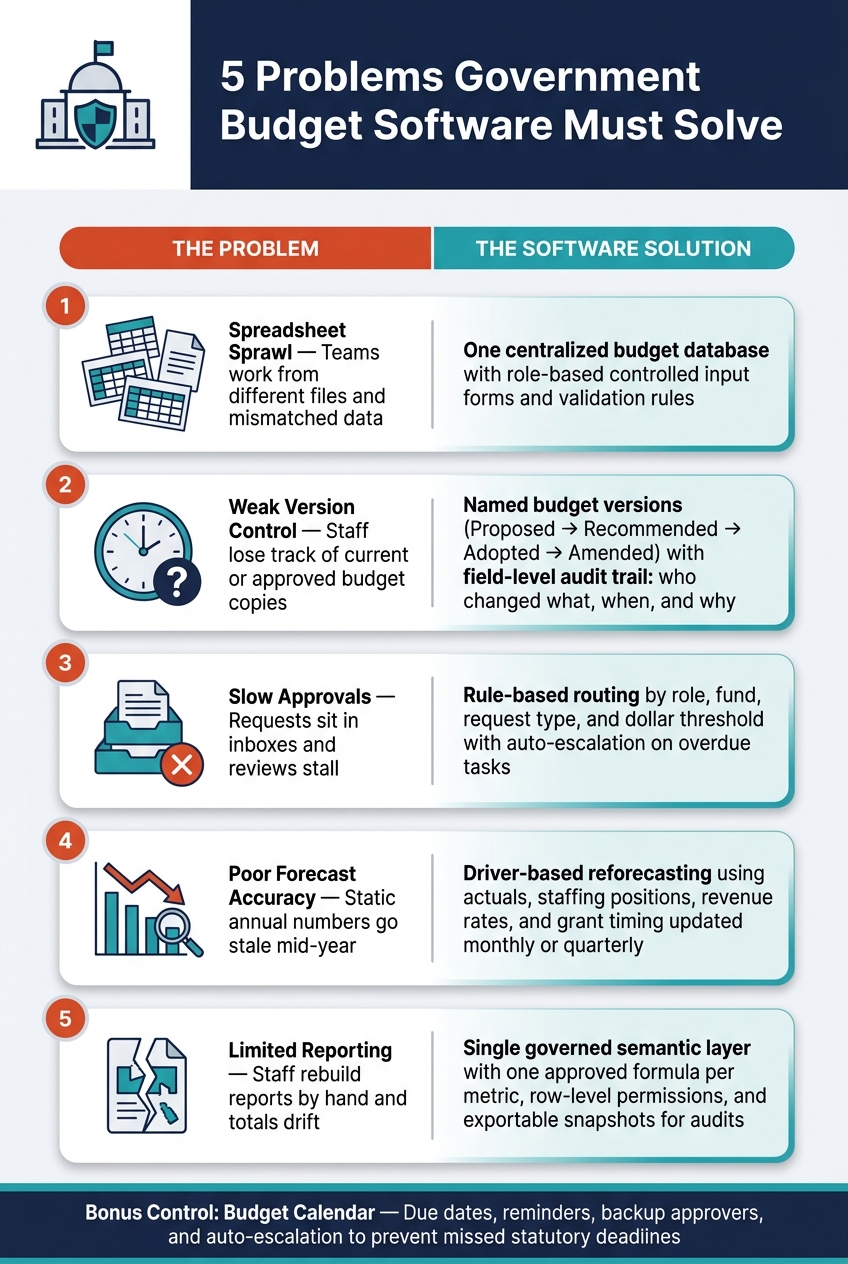
5 Government Budget Software Problems vs. Solutions
Most agencies run budgeting through a patchwork of files: one for operating requests, another for personnel costs, more for capital projects and grants. Then finance has to stitch it all together by hand. Every update slows things down.
A centralized budgeting database fixes that by giving everyone one source of truth for planning data. Finance and departments work from the same numbers, not slightly different versions of them. Core dimensions like fund, department, account, program, grant, project, position, and fiscal year are set once across the system instead of being defined a different way in each department workbook.
That setup only works when departments submit data through controlled forms, not free-form spreadsheets.
Instead of sending out spreadsheet templates, the system should use role-based forms built for each type of submission. Operating, personnel, capital, and grant requests each need their own controlled template, with only the fields required for that request type.
The main goal is simple: stop bad data at the door. Validation rules should run as data is entered. That means:
GAO has specifically identified risks tied to unprotected spreadsheets, including inadvertent changes, undocumented formula or data changes, and incorrectly labeled or aligned columns.[3][4] Controlled forms cut out most of those problems before the data ever gets to finance.
Those submissions only stay useful if they match the source data used by finance and HR.
The system needs live connections to the general ledger, ERP, payroll, and HR systems. When available, API-based integrations keep data current without manual rekeying. For legacy systems, controlled imports are the safer path. Use fixed field definitions, record-count checks, error logs, and a clear reprocessing process.
Spreadsheet uploads should be allowed only for bulk entry. Even then, every row needs to pass the same validation rules, and the central database must stay the system of record.
With one controlled data model in place, the next move is making every change and approval traceable.
Controlled input forms fix the intake issue. Governed workflow fixes the version issue.
When teams rely on files, version control falls apart fast. People end up asking which budget is current, which attachment was approved, and whether someone reviewed an old copy by mistake. Email makes that mess worse. Reviewers can act on stale files, while finance teams are left piecing together decisions from long email threads and forwarded messages.
The fix is simple in principle: track defined budget versions, not file copies.
Agencies need clear version states: Proposed, Recommended, Adopted, Amended, and Revised. Each version should include a unique identifier, owner, creation timestamp, status, effective date, parent version, and approval state. And one rule matters a lot: an amended version should never overwrite the adopted budget. It should point back to that adopted version and record the authorized change that created it.[1][5] Once the current version is clearly defined, every change needs to be traceable.
Every budget-line change should leave a permanent record. If someone updates a number, the system should show who changed it, what changed, when it changed, and why.
Each log entry should capture:
For the audit trail to hold up, logs should be append-only for nonadmin users, searchable by fiscal year and budget version, and exportable for audit review.[6] If you can't search it and export it, it's not much use when an auditor comes calling.
That same discipline has to apply to approvals too. A clean change log helps, but it won't solve much if the review path still runs through inbox chaos.
| Control area | Uncontrolled spreadsheets | Versioned budgeting system |
|---|---|---|
| Source of truth | Multiple files, email attachments, and shared-drive copies | A centralized record tied to a defined fiscal year, fund structure, and budget status |
| Revision history | File metadata or manual notes | Field-level history: prior value, new value, user, timestamp, reason |
| Permissions | Broad folder access or unclear editing rights | Role-based permissions for submitting, reviewing, approving, publishing, and administering |
| Auditability | Reconstructing decisions requires searching email and file metadata | Searchable audit trail with approval events and immutable decision history |
| Amendment handling | Staff may overwrite the adopted file or create another "final" copy | Amendments create a linked version with authorization, effective date, and approval record |
Approval routing shouldn't treat every request the same. A low-risk transfer doesn't need the same path as a major amendment. Smaller changes may only need department and finance review, while higher-risk amendments should move up to directors or governing bodies.[5][7]
Routing rules should be configurable by department, fund, program, budget category, request type, and dollar threshold without custom code changes every fiscal year. That matters more than it may seem. If your process breaks every time a new year starts, the workflow isn't doing its job.
Each task should include a named owner, a due date, and a short list of allowed actions:
When a task becomes overdue, the system should escalate it on its own to a supervisor or alternate approver. Delegation should be time-bounded and recorded. And when separation of duties applies, the system should block users from approving requests they created.[1][7]
With version history and governed approvals in place, the next challenge is making forecasts respond to changing assumptions.
Static annual budgets go out of date fast. A few vacancies last longer than planned, revenue dips, a grant gets delayed, or inflation shifts the math, and year-end results can look very different from the original plan. That’s why a controlled budget record matters: you need to update the forecast without changing the adopted baseline. If vacancies drag on, overtime can climb and benefit costs can shift too. In that case, the original annual formula will misstate both payroll savings and operating costs.
GFOA treats forecasting as a core budget-monitoring function because it shows the future effects of current decisions and can flag the need for corrective action before a gap turns into a crisis.[9] Government budget software should support monthly monitoring, quarterly reforecasts, and event-driven updates when major revenue, labor, grant, or policy changes affect the outlook. At the same time, the adopted budget must stay intact while the forecast updates around it.
The forecast stays useful only if the system keeps historical actuals, assumptions, and scenarios separate.
This only works with a controlled forecast data model. The system should store historical actuals, the adopted budget, prior forecast versions, the current forecast, and approved assumptions as separate but related records. Each record should tie back to a fiscal year, accounting period, fund, department, program, and account. Actuals should load on a regular schedule from the general ledger, payroll, accounts payable, and revenue systems so users can compare the adopted budget with the latest forecast without overwriting either one.
Finance teams should set operational drivers for each major cost and revenue category instead of copying annual formulas forward. For payroll, that means authorized positions, filled positions, and vacancy dates, not a lump-sum amount rolled over from last year. For revenues, it means taxable activity and collection timing. For grants, it means award amounts, eligible spending categories, and reimbursement timing. When a driver changes, the forecast should update on its own, and the reason for the change should be easy to trace. In the driver list, staffing, revenue, and grant inputs are system-driven fields, not spreadsheet assumptions.
GFOA recommends making the assumptions driving the forecast explicit, documenting the methodology, and sharing that information with stakeholders.[8]
Scenario planning follows the same logic. The system should keep an approved baseline - the finance department's current best estimate - and separate scenario layers for events such as a 5% revenue decline or a delayed grant award. Users should change driver values in an assumptions table instead of editing formulas buried in cells. Each scenario should record its creator, timestamp, and approval state, and users should be able to compare scenarios against the baseline without changing the official record. That sets up controlled reporting, because the outputs need to be reproducible if the forecast behind them is going to hold up.
It’s not enough to know the forecast missed the mark. You need to know where it missed and by how much, over time. The system should calculate forecast-versus-actual variance by month, quarter, fiscal year, department, fund, program, expenditure category, and revenue source. Revenue reporting should separately track sources such as property taxes, sales taxes, income taxes, permits, fines, user fees, intergovernmental aid, grants, and investment income. If one source falls short and another runs high, a total-government view can hide both.
| Dimension | Static budget planning | Driver-based forecasting |
|---|---|---|
| Update frequency | Usually annual, with manual adjustments | Monthly monitoring and monthly or quarterly reforecasting |
| Data basis | Adopted budget and fixed formulas | Actual results, historical time series, and current drivers |
| Scenario capability | Limited; depends on spreadsheet copies | Separate baseline and scenario assumptions with controlled comparisons |
| Personnel modeling | Authorized staffing totals or prior-year amounts | Positions, vacancies, hiring dates, pay rates, overtime, and benefits |
| Revenue modeling | Annual estimates entered as fixed amounts | Source-specific drivers, collection timing, rates, volumes, and economic conditions |
| Variance analysis | Total-year and retrospective | Period, fiscal year, department, program, category, fund, and revenue-source analysis |
| Decision usefulness | Shows the original spending plan | Shows the likely year-end result and the actions needed now |
Driver-based forecasting doesn’t remove uncertainty. It makes uncertainty visible. It ties projections to operational facts and gives finance leaders a repeatable way to update assumptions. It also gives finance teams a forecast history they can compare against actuals.
Once forecasts are under control, reporting needs to publish the same numbers every time, without manual rebuilds.
That’s where many government finance teams get stuck. They pull budget data, format it for a council packet, rebuild it again for a public disclosure, then reconcile totals by hand when an auditor asks a follow-up. The issue usually isn’t a lack of charts. It’s source data that isn’t governed. The fix is a single governed reporting layer between your source systems and every output you publish.
A governed semantic layer defines each term once - adopted budget, amended budget, encumbrances, actuals, available balance, variance - and ties each one to a formula, source, fiscal period, and owner.
That matters because ambiguity gets expensive fast. If one department calculates "available balance" as budget minus actuals, while another subtracts encumbrances too, the same fund can show two different numbers in two different reports. A semantic layer stops that by enforcing one approved formula everywhere.
The system should also document whether figures use a cash, modified-accrual, or other budgetary basis, since that changes how budget-to-actual comparisons are shown.[10][11][12] That shared definition layer is what helps every packet, dashboard, and disclosure reconcile.
Row-level permissions should control who can see which funds and accounts. In practice, that means:
Each summary should support drill-down to the fund, department, account, or transaction level where permissions allow. And every dashboard should show a visible last-updated timestamp, the reporting period, and whether the figures are preliminary, approved, or final. If a refresh fails, the system should flag stale data.
At the output stage, use one governed dataset for every audience, then apply different presentation and security rules at the output layer.
Internal reports may include transaction-level detail. Department views can focus on controllable spending. Executive dashboards can call out material variances and forecast risk. Governing-body materials can show fund-level summaries with variance explanations. Public summaries can present accessible totals with plain-language definitions.
Export tools should support Excel workbooks, PDF council packets, budget-book tables, and machine-readable public data files. Every export should preserve filters, period, refresh time, source version, and approval status.[14]
That way, a quarterly council packet can still be reproduced after later transactions or amendments are entered, because the system keeps the snapshot used to produce it. That’s what makes published figures defensible to auditors and governing bodies alike.
The GAO has noted that known data limitations aren't always disclosed to users, meaning a figure can appear accurate without any indication of its timing or completeness constraints.[2][15] Good reporting software makes that context visible by disclosing data limitations with the report, not burying them in a technical appendix.
After version control and routing, the next thing that breaks is timing. Version control tells you which submission is the one to use. Calendar controls make sure it doesn’t sit there untouched. A governed workflow needs built-in calendar logic, not just an approval path.
Put milestone dates right into the workflow so every submission has a due date and a clear dependency. Each milestone should have:
That sounds simple, but it matters. If nobody knows who owns a step, or what has to happen before it, work drifts.
Use assignment alerts, one reminder, an overdue notice, and automatic escalation after a set delay. If the task still doesn’t move, the system should reassign it to a designated backup approver. But that reassignment can’t wipe the slate clean. The workflow should log the original assignee, the replacement, the reason, the timestamp, comments, and the audit trail. In plain English: the handoff should move the work, not erase accountability.
Internal deadlines should come before statutory deadlines. The system should set buffer milestones ahead of public hearings and adoption dates, so the statutory deadline is never the first warning. That buffer is your margin for error. Without it, one late approval can throw the whole calendar off.
Once the workflow has timing rules, the next step is visibility. The system needs to show where work slows down. A daily or weekly dashboard should track stage counts, overdue items, items due in five business days, and deadline risk. That reporting should come from the same workflow data that powers routing and escalation.
Look at stage-level cycle time, not just end-to-end time. Here’s why: if a request spends two days in analysis but nine days waiting for executive sign-off, the problem isn’t the analyst. The problem is the approval queue.
Median cycle time works better than average in this kind of reporting, because a small number of complex requests can pull the average out of shape. It also helps to break results out by department, fund, request type, and reviewer role. That way, finance staff can tell the difference between a delay tied to one department and a delay that points to a system-wide issue - and respond the right way.
These five fixes only work if the agency sets the rules before anyone starts configuring the system.
That means writing down the fiscal calendar, fund structure, chart of accounts, approval authority by role and dollar threshold, amendment rules, and data ownership for each major domain. Put simply, software can't enforce rules that no one has defined.
Before any workflow goes live, each action needs a clear owner. A department manager submits. A budget analyst checks account coding. A finance director approves transfers above the set threshold. The governing body adopts the final budget. No one should be able to create and approve the same transaction. Segregation of duties isn't something you tack on later. It's a core design rule.
The same goes for connected systems. The general ledger, payroll/HR, procurement, and grants systems all need a named owner, a refresh schedule, and a reconciliation rule. If that structure is missing, forecasts won't show current operations. They'll show stale data.
Amendment controls need the same level of discipline. Every post-adoption change should be logged as its own versioned transaction, not saved over the old one. Each amendment record should include:
Once those controls are in place, the system should measure them directly. Track them with operational metrics like these:
| Problem solved | Metric to track |
|---|---|
| Spreadsheet sprawl | Hours to reconcile budget, actual, payroll, and commitment data |
| Weak version control | % of amendments with complete approval, rationale, and version records |
| Poor forecast accuracy | Forecast variance by department, fund, and revenue source |
| Slow approvals | Median and 90th-percentile approval cycle time |
| Limited reporting | Staff hours to produce recurring management and governing-body reports |
| Approval-to-publication time | Time between approval and publication of the official budget or amendment |
GFOA recommends formal budget-to-actual monitoring and recommends that forecasts be regularly monitored and updated, making these measures useful operational indicators rather than merely technology metrics. [13][8]
Budget-to-actual monitoring and regular forecast updates should be treated as operating controls, not just system metrics. Government budget software works when legal authority, data ownership, and workflow controls are built into the system from day one.
Centralized budget software cuts spreadsheet errors by replacing scattered manual files with one live source of truth. Instead of juggling tabs, versions, and copy-pasted numbers, teams work from the same up-to-date data in one place.
It also automates data intake from systems like ERPs and payroll. That means less manual entry, fewer copy-and-paste slipups, and a lot less time spent fixing avoidable mistakes.
Role-based access and in-app approvals help limit unauthorized changes. On top of that, audit logs and validation checks help catch errors before they make their way into reporting.
A strong government budget audit trail should log every transaction and every change so teams can see what happened, when it happened, and who did it.
Each record should include:
It should also let teams filter the history by user, department, date range, or account. And it needs to show the full approval path, including when a budget was submitted, reviewed, locked, or formally reopened.
Public agencies should move past static annual budgets and use rolling forecasts as new data comes in.
A common setup is a monthly cadence for forecast updates and budget-to-actual variance reviews. For day-to-day needs like cash flow management, a 13-week rolling forecast can also be updated weekly or monthly.