Published on
August 12, 2026

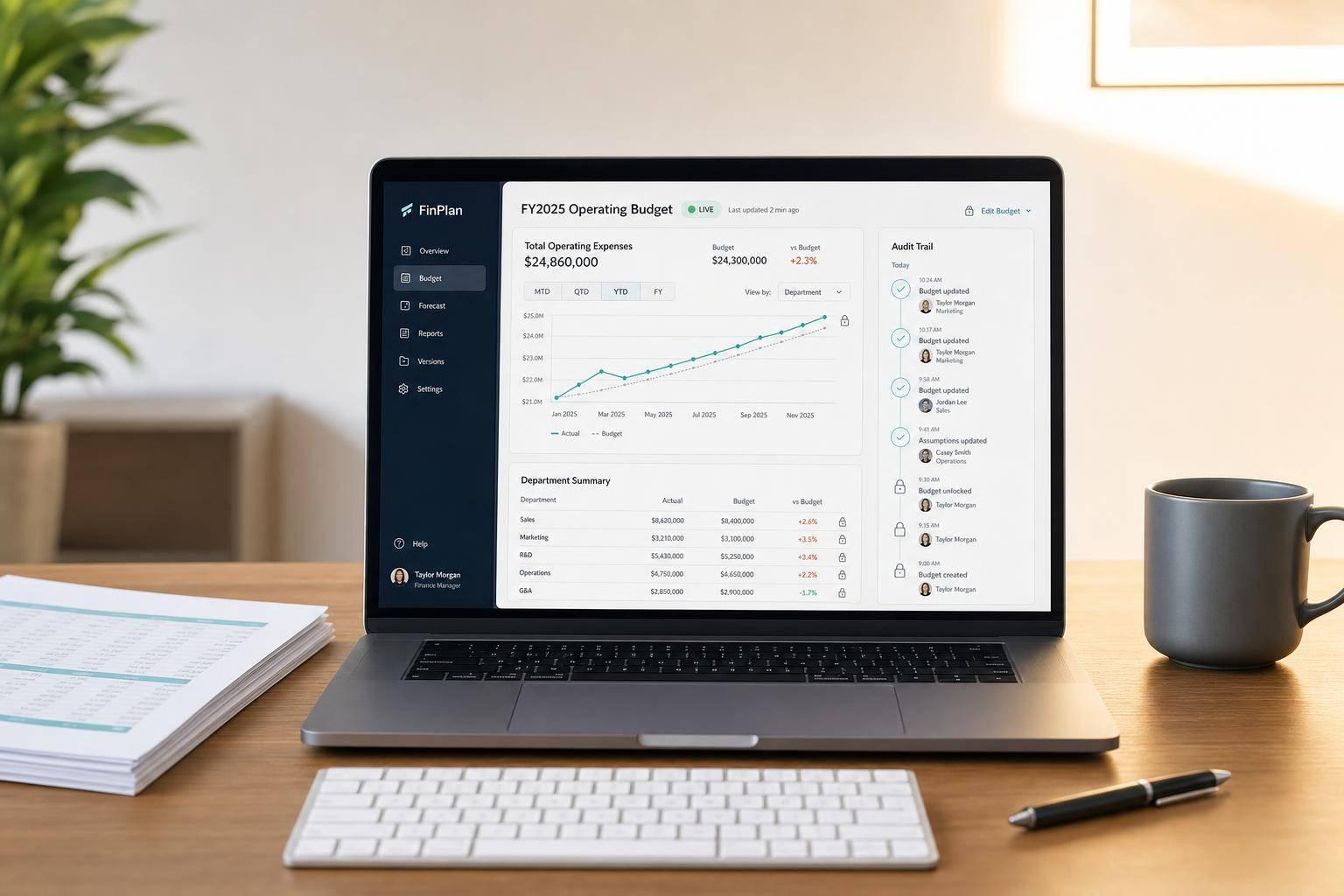
If your budget lives in emailed spreadsheets, version control risk is already a finance problem. I’d sum it up like this: one live budget model cuts file conflicts, shows who changed what, limits edit access, and makes monthly planning easier to run.
Here’s the short answer:
A few numbers stand out:
I see the core idea as simple: the risk is not just spreadsheet errors. It’s what happens when multiple people work from multiple files, with no clear log, no locked approval path, and no single source of truth.
A shared budgeting setup helps by keeping:
| Area | Spreadsheet process | Real-time budgeting |
|---|---|---|
| Source of truth | Many copies | One live model |
| Change history | Hard to trace | Full edit log |
| Collaboration | Back-and-forth files | Multi-user updates |
| Approvals | Email chains | In-app workflow |
| Post-approval control | Easy to change | Locked versions |
| Monthly planning | Manual reconciliation | Shared monthly cadence |
If I were boiling the article down to one line, it would be this: fewer files mean fewer mistakes, clearer ownership, and faster budget decisions. For companies scaling rapidly, fractional CFO services can help implement these systems and ensure data integrity.
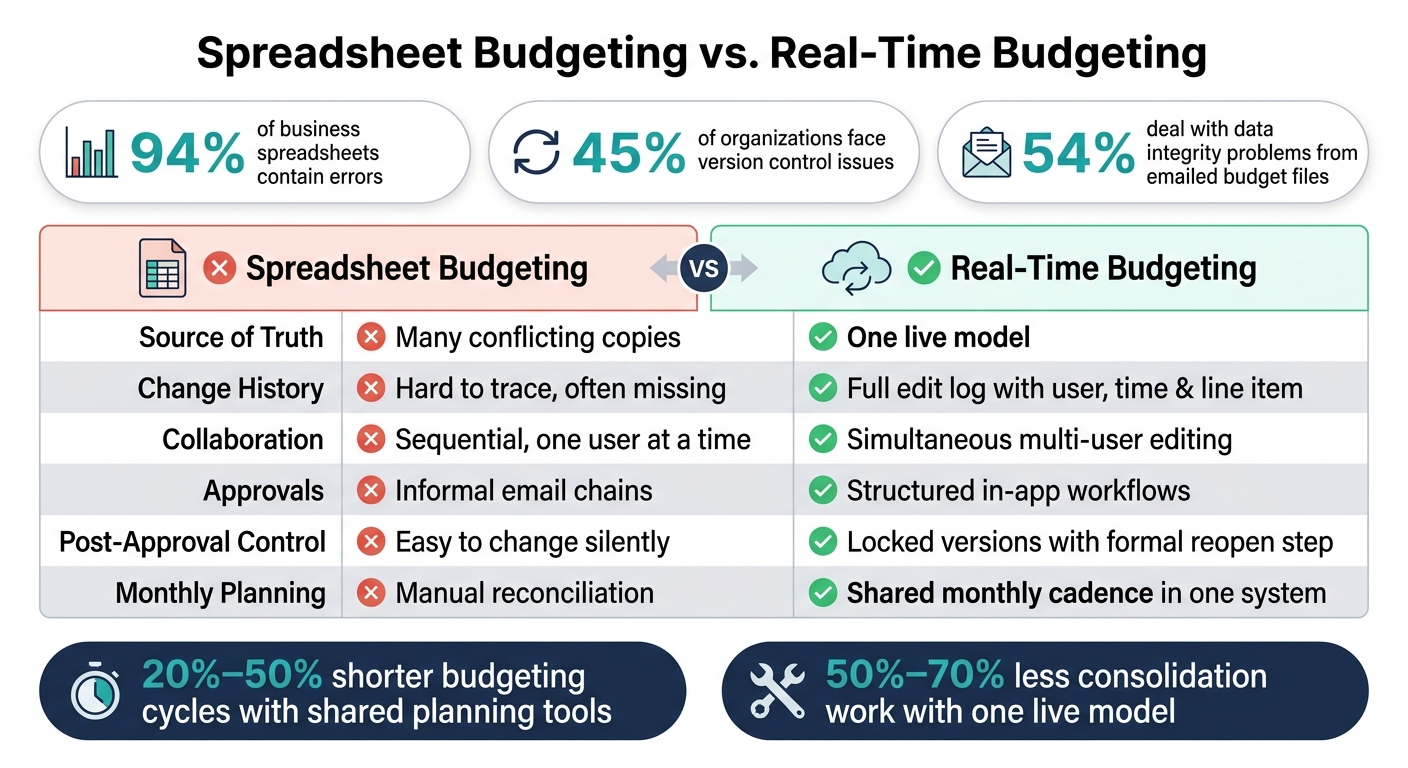
Spreadsheet Budgeting vs. Real-Time Budgeting: Key Differences & Risk Reduction
These failures tend to hit in three common places.
The main issue is simple: duplication. Once people start working from different copies of the same spreadsheet, the numbers stop matching.
Sales ops might use a pipeline forecast downloaded on August 1. Finance updates actuals on August 5. Then, by August 10, the CEO is staring at two revenue figures for the same month - $450,000 in one file and $380,000 in another - with no clean way to tell which one is correct.[3][7]
That same kind of drift shows up elsewhere too. Teams can blow past budget limits or miss cash forecast gaps because they’re using old headcount caps or outdated hiring dates.
And once the files split, the review and approval history splits with them.
Spreadsheets usually don’t show who changed a number or why. If Q4 revenue drops from $2.2M to $1.9M, reviewers can’t easily see who made that edit, whether anyone signed off on it, or what caused the shift.[4][5]
That gap gets worse when investors or lenders ask for backup. Buyers and investors often want a clean record of approved budgets versus reforecasts, plus notes on key assumption changes. If a company can only hand over a folder full of files with no timestamps and no approver records, diligence takes longer.
At that point, finance teams often have to piece the story back together from old emails. It’s slow, messy, and it can lead outsiders to question how dependable management’s reporting is.[4][5]
Once 10 or 20 managers are editing downloaded tabs, finance turns into a manual merge team. One person overwrites a formula. Someone else misses a range update. Two conflicting copies land in the inbox on the same day.[3][6]
Shared folders and file naming rules sound good on paper, but under deadline pressure, they don’t do much to stop overwrite risk.[5]
Real-time budgeting cuts version drift by keeping everyone in one live model instead of spreading work across separate spreadsheet copies.
| Dimension | Spreadsheet-Based Budgeting | Real-Time Shared Budgeting Software |
|---|---|---|
| Version control | Multiple "final" files across email and shared drives | One centralized model; no copies to reconcile |
| Change tracking | Track changes often disabled or lost when copying | Every edit logged with the user, time, and line item |
| Data freshness | Exports go stale within days | Updates flow directly from the general ledger |
| Collaboration | Sequential edits; one user at a time | Simultaneous multi-user editing |
| Approvals | Informal email chains and chat requests | Structured in-app workflows with defined sign-off steps |
| Audit trail | Fragmented or nonexistent | Searchable change log with prior versions |
| Consolidation effort | Manual consolidation across department files | Automated rollups across all departments and cost centers |
That change turns budgeting from file juggling into live collaboration.
Each team enters updates into linked inputs, and those changes roll up into one master budget on their own. Global assumptions stay locked across the model, which helps stop local overrides from sneaking in. Instead of five departments working from five different “latest” files, everyone works from the same place.
Moving to one live model can cut consolidation effort by 50%–70% while improving trust in the numbers.[2][12]
Multiple users can work in the model at the same time, and totals recalculate right away.[9][10][2] That’s a big deal during month-end close, when actuals are still coming in and finance needs a current forecast, not yesterday’s snapshot.
It also removes the lag during quarterly planning. In the old spreadsheet setup, one hiring plan change could trigger a manual refresh across linked tabs. In a shared live model, that update flows through at once. Studies of advanced planning tools report 20%–50% shorter budgeting cycles after implementation.[1][8]
Every update is recorded: who made it, when it happened, which line item changed, and the old and new values. Teams can filter changes by user, department, date range, or account. So if finance wants to review every update to the Travel account in Q2, they can pull that history without digging through email chains.[9][11][2]
That makes reviews much cleaner. Instead of asking, “Which file is right?” reviewers can compare approved budget, forecast, and actuals in one place.
Real-time collaboration solves the stale-file problem. But that alone isn't enough. You still need rules around who can edit, submit, approve, and lock the budget so one shared model doesn't turn into chaos.
The next layer is governance: clear control over who can change what, when they can do it, and how approvals move forward.
| Feature | What it does | Which risk it mitigates |
|---|---|---|
| Budget owner | Owns inputs for a department or cost center | Conflicting ownership and unclear accountability |
| Role-based permissions | Controls view, edit, submit, approve, or lock by role | Accidental overwrites and unauthorized edits |
| Locking | Prevents changes to approved versions without a formal reopen step | Hidden post-approval changes and baseline drift |
| Workflow status | Visible stage of each budget area in a central dashboard | Lost approvals and missed bottlenecks |
| Audit log | Captures who did what and when across the entire workflow | Weak audit trail and difficult due diligence |
Permissions turn policy into something the system can enforce at the department and cost-center level.
In practice, permissions are set by department or cost center. A Marketing manager can update ad spend and events, but not Engineering payroll or companywide benefits rates. Finance can change global assumptions, such as tax rates and benefits load, that individual departments shouldn't override. Executives have approval and lock rights, while their edit access to day-to-day line items stays limited.
That split between editing and approval matters. It keeps the system from depending on file names, side notes, or good intentions alone. Role limits cut down on duplicate edits and baseline drift.
A set workflow moves each department's budget through clear stages: draft → submit → finance review → approve → lock. Once a department owner submits, that section locks for more edits and Finance is notified automatically. Finance can send it back to draft with comments or move it forward for executive approval. After approval, the version locks, and any change after that requires a formal reopen step. That step is recorded in the audit log. That's what stops quiet edits after review.
A central status dashboard shows where each department stands and makes bottlenecks easy to spot without chasing updates over email.

Getting these controls right at the start matters more than many teams think. Permission structures that are set up poorly can slow people down without adding much control. Approval chains can also fail if they don't match how decisions are made in the business. When that happens, people work around the system.
Phoenix Strategy Group works with growth-stage companies on bookkeeping, fractional CFO services, FP&A, data engineering, and cash flow forecasting. That work helps keep budgeting, actuals, and reporting aligned as the business grows.
With permissions and review steps in place, teams can run monthly planning from one shared budget.
Once permissions and approvals are set, the next move is simple: build a monthly rhythm your team can repeat without drama.
Use a fixed monthly cadence: close by Days 1–3, refresh actuals by Days 3–4, review variances by Days 5–6, update the forecast by Days 6–8, and publish the management pack from the same model.
The key here is that every step happens in the same live model. Finance, department owners, and leadership all work from current numbers, without emailed spreadsheets flying around or anyone doing manual reconciliation late at night. That shared setup keeps the process steady from one month to the next.
That same shared model should handle scenario planning too. Keep downside, base, and upside scenarios in one model instead of scattering them across separately named files.
Each scenario uses the same accounts and the same actuals. Only the drivers change. That makes side-by-side comparison much easier and cuts the risk of showing leadership or the board the wrong version.
A shared monthly planning cycle gives finance leaders one trustworthy source of truth.
A live budget model helps stop version drift because it creates a single source of truth. Everyone works from the same up-to-date data. That means fewer duplicate files, fewer stale spreadsheets, and less manual sharing back and forth.
Automated updates from connected systems help keep the model current. On top of that, role-based permissions and audit logs make changes easier to track, review, and control as the team gets bigger.
After a budget gets approved, or once a budget period is officially closed, those numbers should be locked. That stops people from making late edits and keeps historical margin and expense data consistent and reliable.
Teams should also label each budget and forecast version clearly. Include metadata such as the owner, approval date, and key assumptions. That way, everyone can see which version is being compared against actual results.
A monthly planning workflow cuts budget errors because it replaces static, manual work with a clear system. When you pull data from accounting, CRM, and payroll systems, you reduce manual entry and lower the risk of spreadsheet version conflicts.
Each month, teams also review budget vs. actuals to explain material variances and update forecasts based on current conditions. Audit trails, permissions, and real-time alerts add more visibility and accountability.