Published on
July 21, 2026


If your finance platform is growing, Kubernetes helps you split services by team and risk, scale each workload on the right signal, control cloud spend, and keep audit trails in place.
I’d boil the article down to this: don’t treat payments, reporting, batch jobs, and ledger systems like one big pool of compute. Put them into clear namespaces, lock down network paths, use the right autoscaler for each job, and set cost controls before waste piles up. That matters when traffic jumps at market open, month-end jobs hit hard, and compliance work needs a clear record of every infra change.
Here’s the short version:
A few numbers stand out:
| Area | What to do | Why it matters |
|---|---|---|
| Workload layout | Split by namespace, team, and service type | Stops batch and low-priority jobs from affecting payments |
| Scaling | Match autoscaler to workload pattern | Keeps APIs, queues, and batch jobs from scaling the same way |
| Cost | Rightsize, cap usage, pool DB connections | Cuts waste that slowly drives up monthly spend |
| Uptime | Spread across zones and test restores weekly | Lowers outage risk during failures and releases |
| Compliance | Use RBAC, network rules, and Git-based changes | Makes reviews and audits easier to support |
So if I were starting from scratch, I’d keep the plan simple: separate first, scale second, control spend third, and bake audit and uptime work into the platform from day one.
As a financial platform grows, cluster boundaries matter just as much as application code. Clear separation helps teams stay out of each other’s way. It also keeps lower-priority batch work from interfering with payment, ledger, or reporting services.
The next move is to turn those boundaries into namespaces, scheduling rules, and network controls.
Namespaces are the simplest place to start. Use them to separate financial domains or teams so each one has clear ownership and isolation [4].
Use Deployments to control replica counts and rollout behavior for critical services. If some workloads need tighter placement, use node selectors, taints, and tolerations. That way, batch jobs don’t eat up capacity meant for payment or ledger services.
Use quotas to cap CPU and memory per namespace, then pair them with RBAC so engineers can reach only the resources they own. Put together, these controls give each team room to work without letting one group overload the cluster.
NetworkPolicies add another guardrail by limiting east-west traffic between namespaces. For example, you can let the payments service reach the ledger API while blocking access to unrelated services like analytics [4].
Use Services with labels and selectors to keep internal routing stable as pod IPs change [4]. Use ClusterIP for internal APIs like billing or reconciliation so they stay inside the cluster [4].
With workloads separated and service paths kept stable, autoscaling can respond to each service based on its own needs.
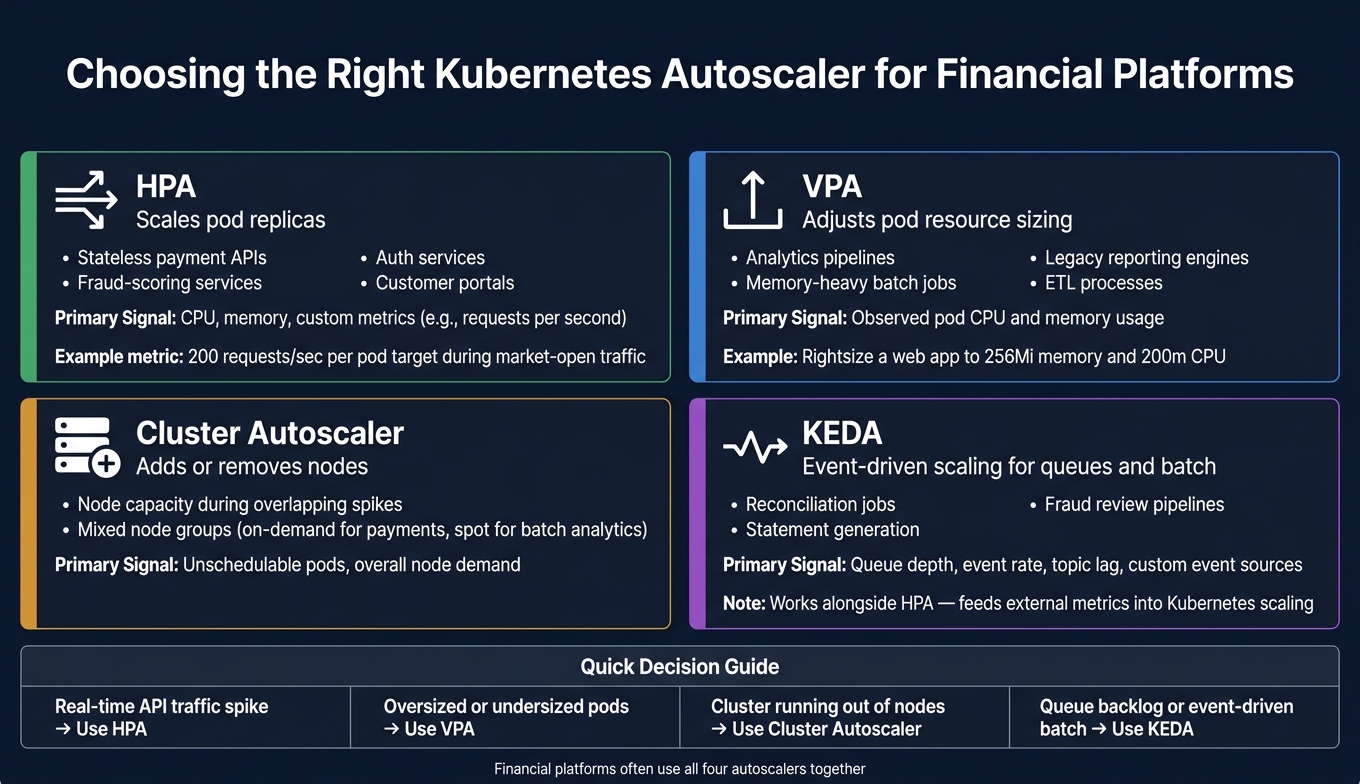
Kubernetes Autoscalers for Financial Platforms: HPA vs VPA vs KEDA vs Cluster Autoscaler
Financial platforms rarely scale in a straight line. Real-time transaction traffic can jump around the U.S. market open. Then you have end-of-month reporting and reconciliation jobs that may sit quiet for weeks, only to slam CPU, memory, and I/O overnight for a short burst.
That’s why payments, reporting, and batch jobs shouldn’t fight over the same pool of capacity. Kubernetes helps you match compute to actual demand instead of sizing everything for the highest possible peak. Once services are split by namespace and ownership, each workload can scale on its own demand curve.
Use the autoscaler that fits the job. HPA handles replicas. Cluster Autoscaler adds or removes nodes. VPA adjusts pod sizing. KEDA is a good fit for event-driven jobs. Each namespace should scale based on its own traffic pattern and risk level.
| Autoscaler | Common Financial Use Cases | Primary Scaling Signal |
|---|---|---|
| HPA | Stateless payment APIs, fraud-scoring services, auth services, customer portals | CPU, memory, custom metrics like requests per second |
| VPA | Analytics pipelines, memory-heavy batch jobs, legacy reporting engines, ETL processes | Observed pod usage |
| Cluster Autoscaler | Node capacity during overlapping spikes | Unschedulable pods, overall node demand |
| KEDA | Event-driven batch jobs such as reconciliation, statements, and fraud review | Queue depth, event rate, topic lag, custom event sources |
KEDA works alongside HPA instead of replacing it. It feeds external event metrics into Kubernetes scaling decisions.[7][8] Once each workload is scaling on the right signal, the next step is to add business metrics and reliability controls so scaling stays steady.
CPU and memory don’t always tell the whole story. A fraud-scoring service can be under heavy transaction pressure even when CPU still looks fine.
For that reason, it makes sense to scale on business metrics such as requests per second, queue depth, or topic lag. Expose those metrics through a setup like Prometheus with a custom adapter, then point HPA at those signals directly.[6] For example, a team might set a target of 200 requests per second per pod during market-open traffic.[6]
For overnight analytics and end-of-month reporting, queue depth and batch backlog are better triggers. KEDA can scale report workers from queue length so the cluster clears the backlog before the next business day.
Good scaling signals are only part of the story. You also need guardrails so growth stays controlled. Critical payment and ledger services should scale more cautiously, while batch jobs can move much faster.
Start with requests based on baseline usage and limits set above normal spike levels. That gives the scheduler enough information to place pods well without choking traffic through throttling.[5][6] Then pair that with Pod Disruption Budgets (PDBs). For instance, you might require at least 70% of payment-API pods to stay available during node upgrades or autoscaler-driven rescheduling.[5][6] That reduces the odds of a maintenance event turning into a customer-facing outage.
At the node level, mixed node groups give teams more control. Critical services like card authorization can stay on on-demand instances, while batch analytics can run on lower-cost spot capacity. Add HPA stabilization windows and slower scale-down policies to cut down on thrashing during short lulls.[5]
Once autoscaling is set up, cost becomes the next big limit. In a financial platform, the biggest problems usually aren't sudden spikes. It's the slow, steady drain from waste. The usual suspects are oversized pods, too many database connections, and read-heavy workloads that lean too hard on expensive systems.
Overprovisioned CPU and memory are often the biggest source of waste. Teams set generous defaults early, everything seems fine, and then no one circles back. Months later, you're paying for headroom no one uses.
PostgreSQL is another common pressure point. It uses roughly 5–10 MB of RAM per connection, so unchecked connection growth adds up fast[1]. Reporting and analytics can also get pricey. Slow queries and I/O-heavy queries push compute usage up, which means query analysis belongs in cost control just as much as performance work[1].
Start with observed usage, not guesses. Rightsize requests and limits based on what workloads actually consume. For instance, a lightweight web app can run with 256Mi memory and 200m CPU, which cuts idle capacity without choking the app[1].
For database-heavy services, deploy PgBouncer as a sidecar in application pods. That way, connections are multiplexed over localhost, which cuts pressure on the central database and reduces memory overhead[1].
A few other controls help keep waste from spreading:
statement_timeout to 5 seconds and process big changes in 1,000-row batches with short pauses[1].Capacity planning shouldn't live in a separate lane from finance. Review it against revenue, transaction, and hiring forecasts so infrastructure spend stays predictable as the platform grows. In plain English: if the business expects more customers, more payments, or a larger team, platform plans should reflect that early.
Those cost controls also need to stay in line with uptime targets and audit requirements. Saving money is good. Saving money in a way that creates risk for availability or compliance is not.
Once scale and cost are in check, the next pressure point is operational risk. In financial platforms, downtime isn't just a technical problem. It hits the business too. Kubernetes has to stay steady even after the platform grows.
Start with multi-zone deployment. Spread payments, ledger, and reporting services across availability zones so one zone failure doesn't bring down the whole platform. For stateful services, use streaming replication with a primary and replicas across zones.
For deployments, canary rollouts help limit the blast radius of a bad release. Sending changes to 10% of traffic, then 25%, 50%, and finally 100% - with automatic rollback thresholds at each stage - cuts risk during change windows. FinStack used this setup with AWS EKS and Karpenter and cut its Mean Time to Recovery (MTTR) from 47 minutes to 3.8 minutes, a 92% improvement [3].
Use rolling updates for lower-risk services, canaries for critical releases, and blue-green only when you can afford duplicate capacity.
Backups sound good on paper, but they only count if restores work when things get messy. Test restores every week with a CronJob that restores the latest backup to a temporary database and runs validation queries.
The same release controls that lower outage risk should also leave a clear audit trail.
For U.S.-based platforms handling regulated customer data, transaction logs, and infrastructure changes - whether under SOC 2, PCI DSS, or FFIEC - logging and access controls need to track every data access and every infrastructure change. Use Kubernetes RBAC to enforce least-privilege access across namespaces. Then apply network policies to isolate sensitive workloads so those controls don't drift over time [2].
OpenTelemetry tracing can speed up incident response and make audits much easier. FinStack used Grafana Tempo to catch three critical data-flow regressions before they reached production [3]. That's when observability stops being just an ops tool and starts helping with compliance too.
The teams that get the most from Kubernetes on financial platforms treat reliability, compliance, and deployment discipline as one system. They build those habits into the platform from day one, instead of waiting for the first outage to force the issue.
Finance teams should split workloads into separate Kubernetes namespaces when they need to isolate regulated data for compliance, such as PCI DSS, GLBA, or SOX.
Namespaces also make it easier to separate products, departments, or projects. That setup simplifies access control, network segmentation, and cost allocation.
Choose the tool based on how your workload grows and shrinks:
Used together, these tools help keep financial platforms responsive while keeping costs tied to actual usage.
Start by getting clear visibility into the data feeds and resource use that matter most.
That usually means keeping a close eye on high-risk workflows, like bank imports, revenue syncs, and billing data. If one of these breaks, the damage can spread fast. On the cloud side, track spending metrics like cost per customer and cost per transaction so you can spot waste early, whether that’s idle storage sitting around or compute instances that are bigger than the job calls for.
It also helps to watch for real-time spend spikes instead of waiting for the month-end bill to tell you something went wrong. At the same time, make sure at least 90% of cloud spend is clearly allocatable. If too much spend sits in a vague “shared” bucket, it gets hard to tell what’s driving costs.
Don’t stop at cost data, either. Keep an eye on core system health signals like p99 latency, 4xx and 5xx error rates, and connection usage. Those numbers often show trouble before a team feels it in a support ticket or sees it in lost revenue.